Lab 3.10 - Promote a subset with promotion branches (Beta)
The situation
Five stories landed this week and all five are in UAT. The release is Thursday and the date does not move: the warehouse cutover depends on the new status being in production before the weekend.
| Story | Author | What it does | State |
|---|---|---|---|
| US-058 | Romain | Stores the warranty term on a panel batch. It works. Nobody has approved the wording, because the person who approves wording is away until the middle of next week | Not approved |
| US-057 | Mariia | Gives planners an Awaiting Parts status for an installation held up by a missing part. The operations lead tested it on Tuesday and signed it off in writing | Approved |
| US-059 | Romain | Stores the supplier on a panel batch. He wrote it the day after US-058, and put the new field right under the warranty term on the layout, because both come off the same invoice. The buyer signed it off on Wednesday | Approved |
| US-060 | Mariia | Flags an installation that needs scaffolding. It works too, and the operations lead is holding it: the crews have not been told what to do with a flagged site, and a flag nobody acts on is worse than no flag | On hold |
| US-061 | Mariia | Puts the gate code of the site on the installation. The crew leads tested it on Tuesday and want it before the weekend | Approved |
So you have a release window holding three approved stories and two stories nobody has said yes to,
and the ordinary promotion is all or nothing. It carries uat as it stands, US-058 and US-060
included.
This is the exception, and it should stay rare
Promoting branches rather than features is the recommended way, and every other lab of this level does it. A version whose stories were tested together is the version that was tested.
A promotion branch breaks that on purpose. After it, uat and preprod hold different things,
the orgs behind them drift apart, and production runs a combination nobody ever tested as a
whole. That is a real cost, paid later, usually by whoever is on call.
Use it when a date cannot move and an approval has not arrived. Do not build a process on it: a team that assembles a promotion branch every week has a sign-off problem, not a tooling problem, and the fix is upstream.
Before you start
- Lab 3.9 finished
- All four branches deploying, and the four orgs connected
-
enablePromotionBranchesandallowedPromotionStepspublished in Lab 3.1, and carried up topreprodby the promotions of Labs 3.5 and 3.6 - Nothing waiting in the Source Control panel that you still care about
- SF Merge Driver, at the bottom right of VS Code, shows a grey circle: the driver is off. If the circle is green, click it to turn the driver off, or it solves the conflicts of step 4 before you see them
Steps
1. Check the feature is on, and where it is allowed
Goal the two promotion settings checked before you rely on them.
Refresher Lab 3.1
The two settings this lab needs were published in Lab 3.1 and have been travelling up the pipeline with every promotion since.
Do
- Open the DevOps Pipeline panel, the gear menu, then Configure Pipeline Settings
-
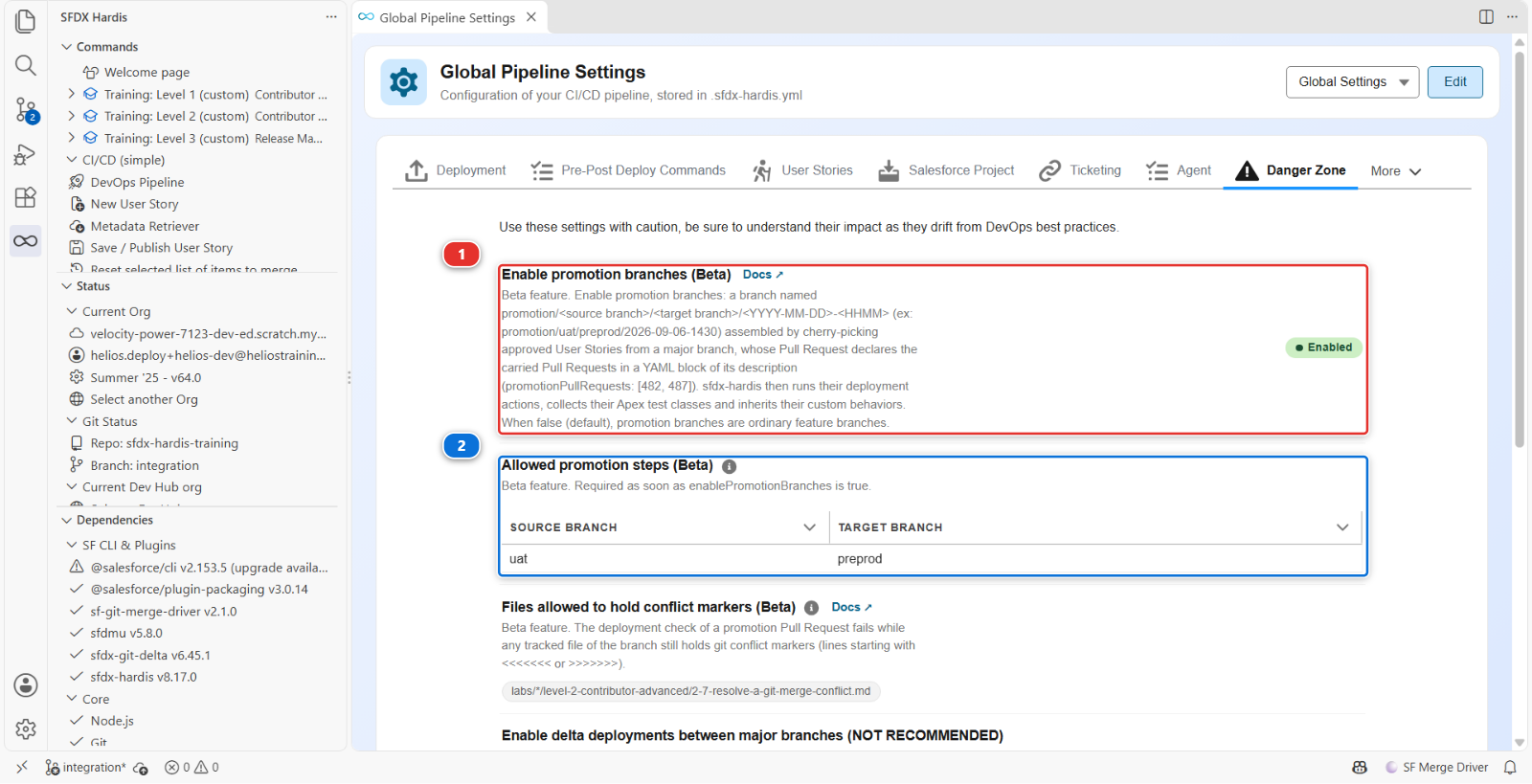
Choose the scope Global Settings, and open the Danger Zone tab
-
Read the line at the top of that tab before anything else: Use these settings with caution, be sure to understand their impact as they drift from DevOps best practices.
- Check that Enable promotion branches (Beta) (1) reads Enabled: the feature is on for the whole project
- Check that Allowed promotion steps (Beta) (2) holds one row, source
uatand targetpreprod: the only step a release manager here may assemble a promotion on
Why
The product puts this feature in the same drawer as delta deployments between major branches, and for the same reason.
The allowed steps are not paperwork. They are why the button you are about to use exists on uat
and not on integration: a subset is a decision about what goes to the stage in front of
production, and nobody needs to make it on the way into an integration org that is rebuilt from the
branch anyway. sf hardis:project:promotion:create refuses to run at all while the list is
missing, rather than guessing that every major branch may promote into every other one.
Under the hood: why a switch published in Lab 3.1 matters now
Both settings are project level, in config/.sfdx-hardis.yml:
enablePromotionBranches: true
allowedPromotionSteps:
  - source: uat
    target: preprod
The deployment job of a promotion Pull Request runs on the promotion branch, and a promotion branch
is cut from its target, so the configuration it reads is the one preprod carries. A switch
turned on today in integration would not be in preprod until a promotion put it there, and until
then the job would treat the promotion Pull Request as an ordinary feature branch: it would still
deploy, and it would quietly ignore the stories the branch declares.
That is why the switch was published in Lab 3.1 with the rest of the pipeline configuration, and why it has been inert ever since: with no promotion branch in the repository, a project with the feature on behaves exactly like a project with it off.
You should now see
- The feature Enabled, and exactly one allowed step:
uattopreprod
2. Take in the five stories, in order, and promote them the usual way
Nothing here is new, so it is written short.
Do
-
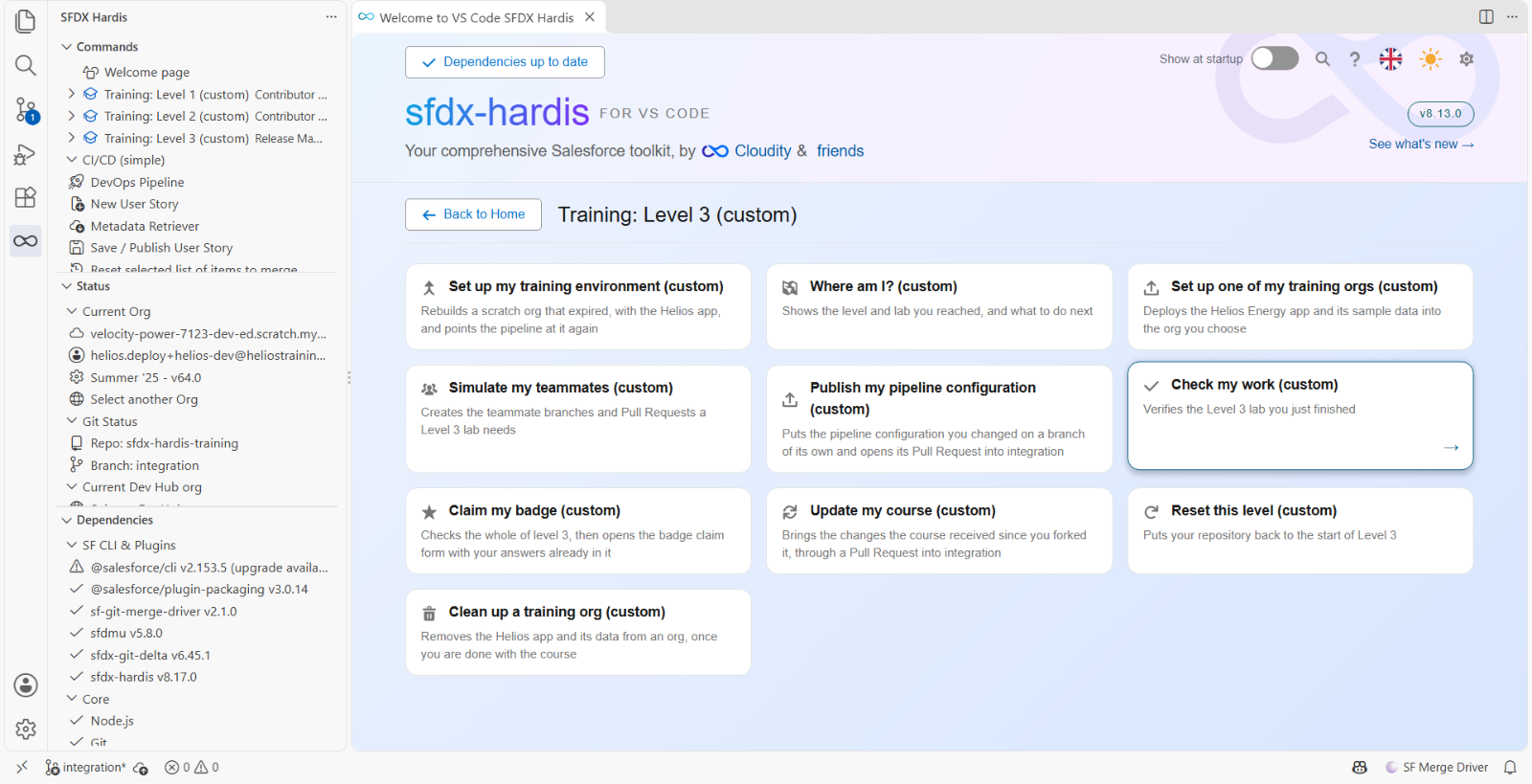
Open Welcome page > Training: Level 3 > Simulate my teammates
-
Take the five stories of the table below one at a time, from top to bottom. For each one, do tasks 3 and 4 before you take the next
- Review it with the four questions of Lab 3.2
- Merge it into
integrationwith Squash and merge, as every feature Pull Request of this course. You do not have to wait for its deployment before you take the next one: they queue onintegration - When the last one is green, promote
integrationintouatthe way Lab 3.5 did: the + PR chip on the arrow, a title a human can read, then a merge commit (Create a merge commit, under the arrow of the green button)
| # | Story | Needs first | Merged |
|---|---|---|---|
| 1 | US-058 Record the warranty term on a panel batch | - | [ ] |
| 2 | US-057 Park an installation that is waiting for parts | - | [ ] |
| 3 | US-059 Record the supplier of a panel batch | US-058 in integration |
[ ] |
| 4 | US-060 Flag an installation that needs scaffolding | - | [ ] |
| 5 | US-061 Record the gate code of a site | - | [ ] |
Careful
The feature Pull Requests use Squash and merge. The promotion of integration into uat
uses a merge commit, never a squash.
Why this order
The order is the week as it happened, and it matters twice. US-059 was written on top of US-058:
Romain cut his branch after the warranty term was merged, and put the supplier field right under
it. The simulation refuses to build US-059 while US-058 is not in integration, and tells you so.
And the order the stories were merged in is the order the uat window lists them in, which step 4
reads from top to bottom.
Under the hood: how the simulation knows US-059 needs US-058
Each teammate story is a scenario under scripts/simulate/, and us-059-supplier/scenario.json
carries one line the others do not:
"basedOn": "us-058-warranty-term"
Before cutting the branch from your integration, the command checks that every change of US-058
is there: the field file, its row on the layout, its grant on the permission set. Without them, the
patch of US-059 has no line to anchor on, since it places Supplier__c after Warranty_Years__c.
The check turns a cryptic "cannot be placed" into a sentence naming the story to merge first.
You should now see
- The five stories in
uat, deployed tohelios-uat
This is the moment a real week reaches: everything is testable, and only part of it is approved.
3. Decide, before you touch anything
Goal an option chosen, and its reason written down.
You have three options and the tool only helps with one of them. Know why you picked it.
| Option | What it costs | When it is right |
|---|---|---|
| Wait for the approvals | The release slips by a week | Almost always. It is the only option that keeps the orgs aligned |
Take US-058 and US-060 back out of uat |
Two reverts, each on a feature branch of its own that goes through integration and then uat like any story, never a commit on uat itself, and both stories have to come back later, rebased and retested |
When a story is genuinely wrong, not merely unapproved |
| Carry US-057, US-059 and US-061 alone | uat and preprod drift apart until the next full promotion, and US-059 has to be pulled off US-058 |
When the date is fixed, the approvals are not coming, and the stories left behind are fine where they are |
This week it is the third one, and the reason is written down: the warehouse cutover.
Do
- Write that reason somewhere a successor will find it. The Pull Request you are about to create is a good place, and step 7 comes back to it
You should now see
- The third option chosen, and its reason, the warehouse cutover, ready to paste
4. Pick what goes
Goal a promotion branch assembled with three stories, and the conflict it knows is coming committed for later.
Refresher Lab 3.5
Do: select the stories
-
Open the DevOps Pipeline panel and click the
uatnode. The window that opens is the one Lab 3.5 used to read a promotion window, with two things on it that were doing nothing until now: a checkbox on each User Story row (1), and Create promotion from uat (Beta) in the footer (2)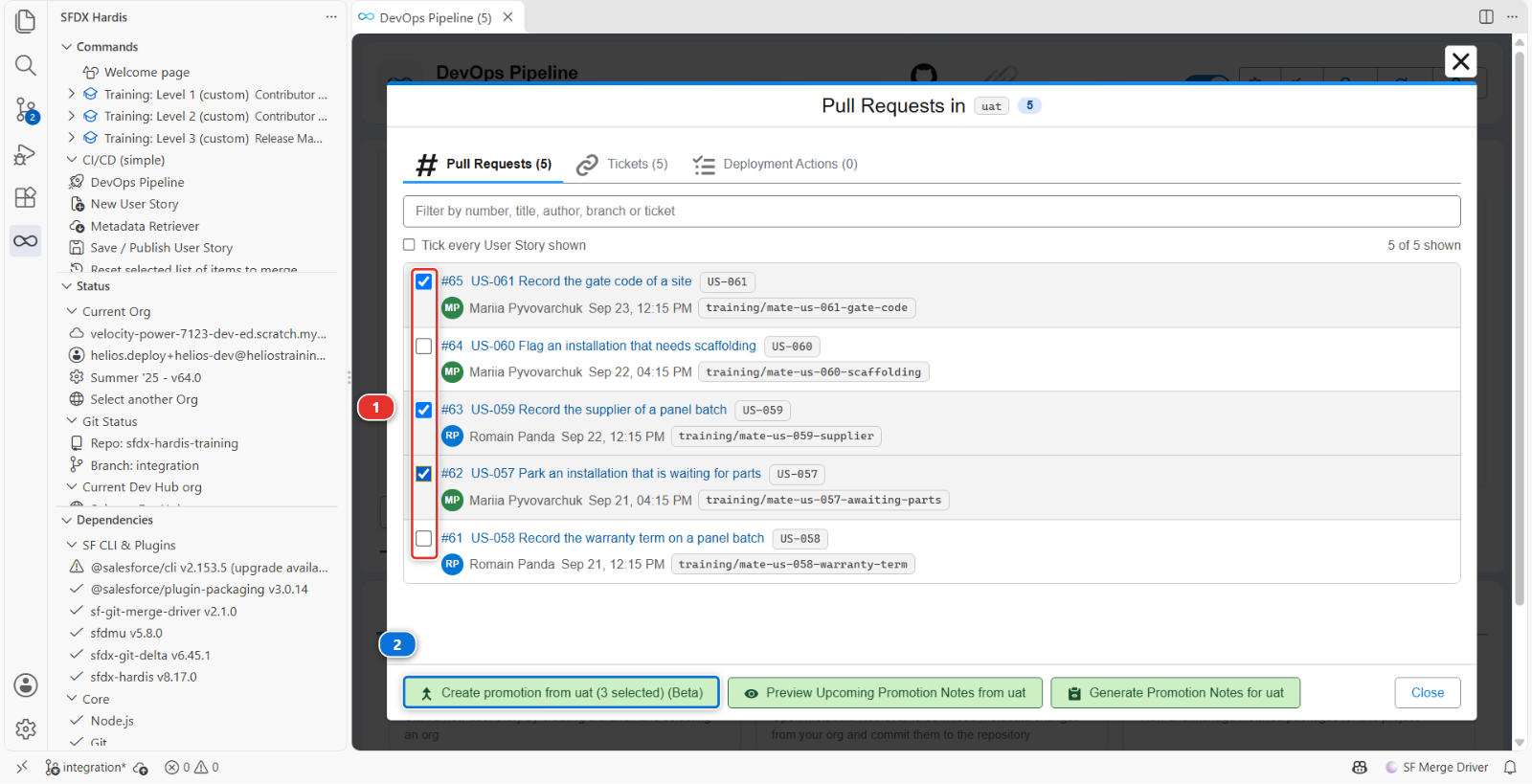
-
The window lists the five stories newest first: US-061, US-060, US-059, US-057, US-058. Tick the first, the third and the fourth, US-061, US-059 and US-057, and leave US-060 and US-058 alone
- Leave the older Pull Requests under them unticked too: the retrofit of Lab 3.7 and the configuration of Lab 3.8
- The button label counts what you ticked: Create promotion from uat (3 selected) (Beta). Click it
-
A command execution tab opens. It lists what is waiting in
uat, then asks one question, Select the Pull Requests to carry in the promotion branch, with your three stories already ticked (1). Read the list once more and confirm (2)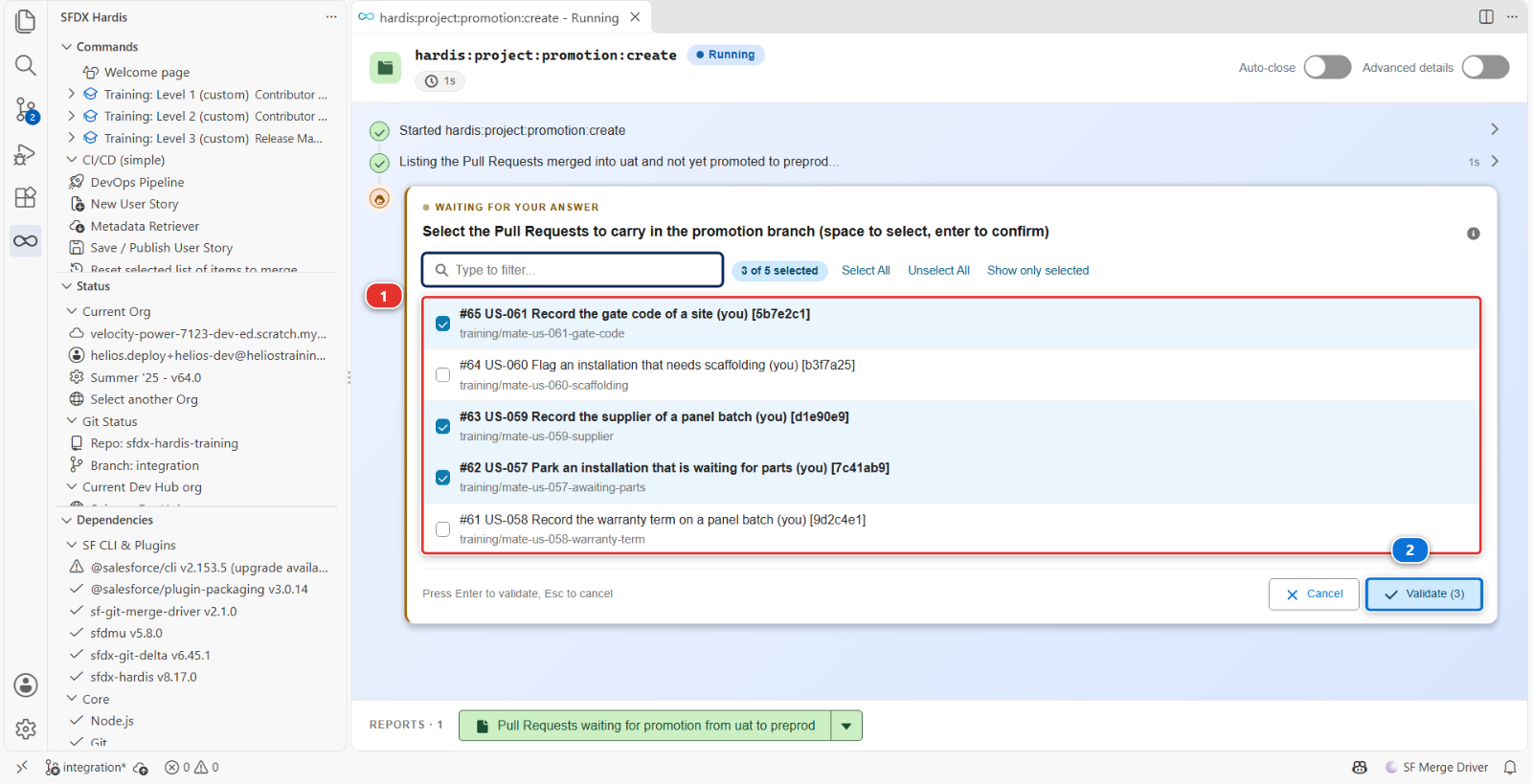
Why
Both the checkboxes and the button appear because uat is the source of an allowed promotion step
and preprod is where it goes. The panel passed your choice to the command, and the command asks
you to confirm it rather than taking it on trust.
Then read the log, because it is doing something you would otherwise be doing by hand, and this time it does not get to the end on its own:
3 Pull Request(s) selected for the promotion
Creating promotion branch promotion/uat/preprod/2026-09-24-0930 from origin/preprod...
Cherry-picking #62 US-057 Park an installation that is waiting for parts (my-username) [7c41ab9]...
Cherry-picking #63 US-059 Record the supplier of a panel batch (my-username) [d1e90e9]...
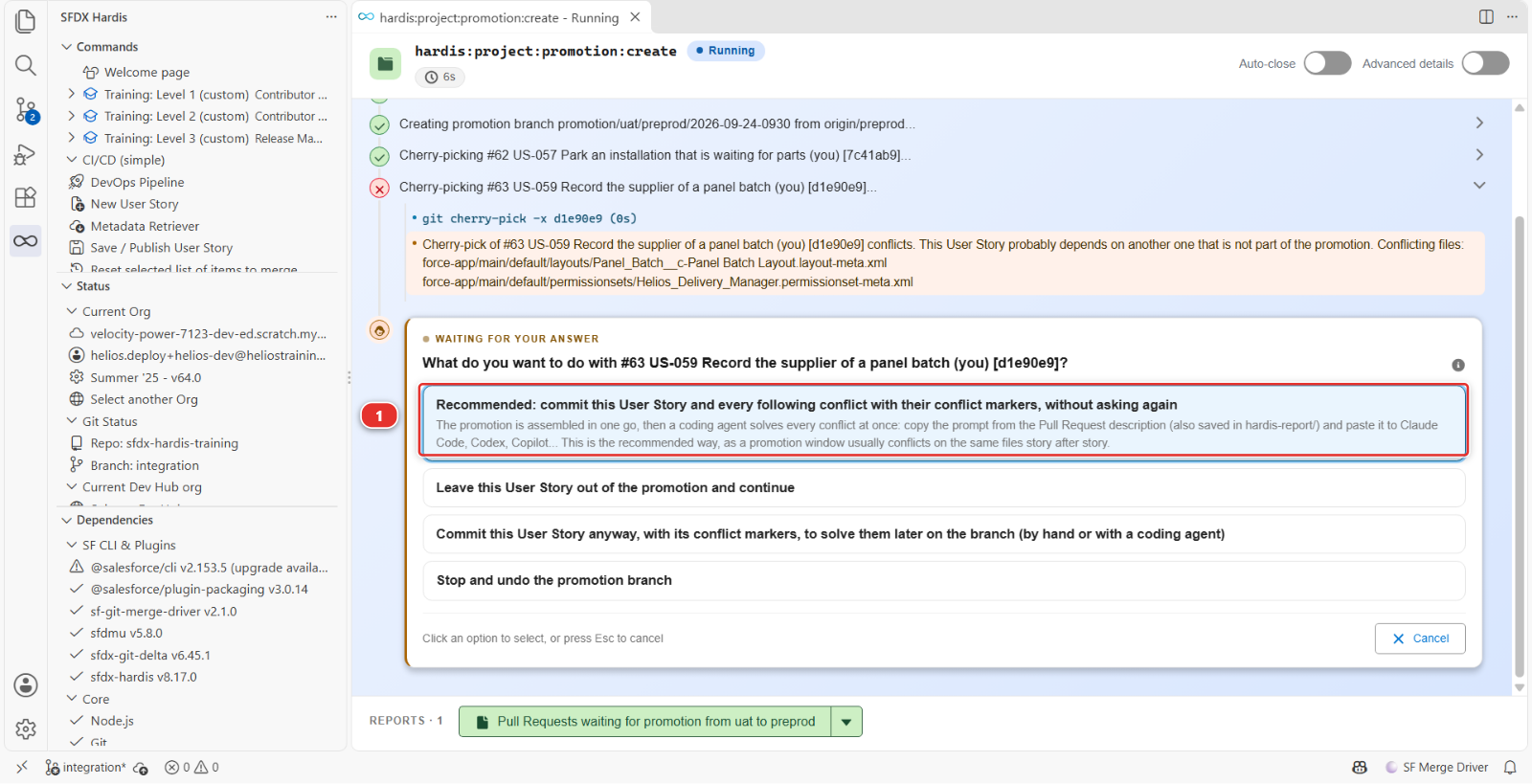
Cherry-pick of #63 US-059 Record the supplier of a panel batch (my-username) [d1e90e9] conflicts.
This User Story probably depends on another one that is not part of the promotion. Conflicting files:
force-app/main/default/layouts/Panel_Batch__c-Panel Batch Layout.layout-meta.xml
force-app/main/default/permissionsets/Helios_Delivery_Manager.permissionset-meta.xml
The numbers are those of the course's own fork; yours differ, and the story names are what to read.
The cherry-picks go oldest first, so US-057 went in cleanly, and US-059 stopped: it was written on
top of US-058, and preprod has never seen US-058.
Do: answer the conflict question
-
The command asks what to do with US-059, and offers seven answers (1). Take the first one, Recommended: commit this User Story and every following conflict with their conflict markers, without asking again
Careful
Do not pick leave this User Story out because it looks cleaner. The buyer signed US-059 off, and a promotion that quietly drops an approved story because git found it awkward is a promotion whose Pull Request lies about the week.
Why this answer
The promotion is assembled whole, conflict included, and you solve it in one pass on the branch afterwards, in step 6. The other answers, in the order the question lists them, are for other weeks: commit this one with its markers but ask again on the next conflict, solve this conflict now in the editor while the command waits, leave the story out, the two risky ones below, or stop and undo everything.
The two answers marked (risky) keep the uat side of every conflicting line, and nobody reads
what they decided. Here they would keep the Warranty Years row and grant that step 6 deletes by
hand, which belong to US-058, a story this promotion leaves behind. This week the validation would
still catch it, because preprod has no Warranty_Years__c field and the deployment fails. With a
field that already exists in preprod, nothing would: the files are only listed, under a warning
in the Pull Request description and at the end of the commit message of the story, for somebody to
read before merging.
The log goes on to the end:
Conflict handling: commit-with-markers-all
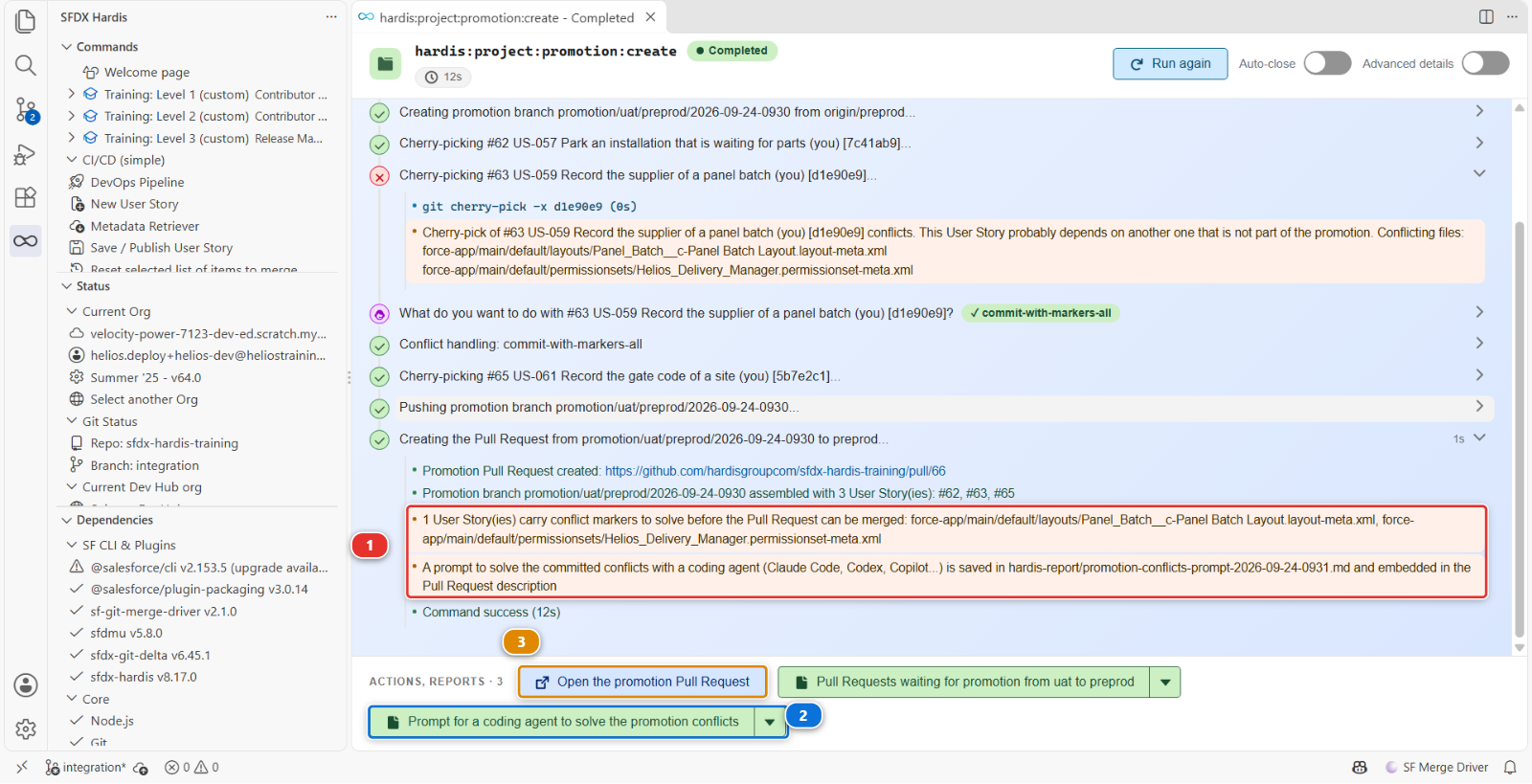
#63 US-059 Record the supplier of a panel batch (my-username) [d1e90e9] committed with conflict markers in: force-app/main/default/layouts/Panel_Batch__c-Panel Batch Layout.layout-meta.xml, force-app/main/default/permissionsets/Helios_Delivery_Manager.permissionset-meta.xml. Solve them on the branch before merging
Cherry-picking #65 US-061 Record the gate code of a site (my-username) [5b7e2c1]...
Pushing promotion branch promotion/uat/preprod/2026-09-24-0930...
Creating the Pull Request from promotion/uat/preprod/2026-09-24-0930 to preprod...
Promotion Pull Request created: https://github.com/my-username/sfdx-hardis-training/pull/66
Promotion branch promotion/uat/preprod/2026-09-24-0930 assembled with 3 User Story(ies): #62, #63, #65
1 User Story(ies) carry conflict markers to solve before the Pull Request can be merged: force-app/main/default/layouts/Panel_Batch__c-Panel Batch Layout.layout-meta.xml, force-app/main/default/permissionsets/Helios_Delivery_Manager.permissionset-meta.xml
A prompt to solve the committed conflicts with a coding agent (Claude Code, Codex, Copilot...) is saved in hardis-report/promotion-conflicts-prompt-2026-09-24-0931.md and embedded in the Pull Request description
US-061 went in cleanly after the conflict, although it touches the same Installation layout as US-060, the other story left behind: a conflict needs both changes in the same lines of the same file, and Mariia put the gate code at the top of the layout and the scaffolding flag further down.
Under the hood: what the button ran, what the branch name means, and what a conflict is here
The button ran, in the command execution panel:
sf hardis:project:promotion:create --source-branch uat --target-branch preprod --pull-requests 62,63,65
--target-branch was passed rather than asked because allowedPromotionSteps leaves uat exactly
one target. With several allowed, the command would have asked. The answer you gave to the conflict
question is what --on-conflict commit-with-markers does for every conflict of a run, which is how
an agent or a pipeline gives it.
The branch is named promotion/<source>/<target>/<YYYY-MM-DD>-<HHMM>, in UTC, and a -2, -3 is
appended only when that minute is already taken. The shape is fixed and not configurable: the
deployment jobs, the pipeline diagram and the release notes all recognise a promotion by it.
It is cut from origin/preprod, not from uat. That is the whole trick: a branch that starts from
the target and receives only the chosen commits cannot carry anything you did not choose. The
commits are copied with git cherry-pick -x, which keeps the original message and adds a
(cherry picked from commit ...) line, so the copy can be traced back to the commit on uat that
it came from.
A cherry-pick rewrites the commit SHA, which is why the Pull Request has to declare what it carries in words: nothing in git links the copy to the Pull Request it came from any more.
The conflict is git being exact, not git being difficult. The commit of US-059 says "after the
Warranty Years row of the layout, add a Supplier row", and "next to the Warranty Years grant of the
permission set, add a Supplier grant". On preprod there is no Warranty Years row and no Warranty
Years grant to anchor on, so git stops and writes both versions into the file, between markers:
what preprod has on the <<<<<<< HEAD side, which is nothing at that spot, and what the story
brought on the >>>>>>> side, the Warranty Years entry and the Supplier entry together. Git cuts
the block where the lines stop matching, not where an XML element starts: in the layout, the two
opening lines of the Warranty Years row are also the opening lines of the row that follows on
preprod, so they sit just above the markers, and the incoming side runs from the Warranty Years
field to the opening lines of the row after Supplier. The
recommended answer commits the files exactly like that, so the branch can be pushed, the Pull
Request opened, and the decision made where it can be reviewed.
Command documentation: hardis:project:promotion:create
You should now see
- The two last warnings of the run (1) saying what is left to do
- In the bar along the bottom, the two things you need next: the prompt for a coding agent, saved as a report file (2), and Open the promotion Pull Request (3)
5. Read what it created
Goal you know what the promotion Pull Request declares, why its check is red, and where the promotion shows in the pipeline.
Do: read the Pull Request
-
Click Open the promotion Pull Request. It is titled
Promotion uat to preprod (2026-09-24-0930), and its description holds the only thing that makes any of this work, plus, this week, a warning:OutputPromotion branch `promotion/uat/preprod/2026-09-24-0930` carrying 3 User Stories approved in `uat`, cherry-picked for `preprod`. > ⚠️ **Conflicts to solve before merging.** 1 User Story was committed with git conflict markers > (`<<<<<<<`, `=======`, `>>>>>>>`) left in the files listed below. Solve them on this branch, by hand > or with a coding agent, and push: the validation job fails until they are gone. ```yaml promotionPullRequests: [62, 63, 65] ``` ## Carried Pull Requests | Pull Request | Title | Author | Source branch | Commit | |--------------|-------------------------------------------------------|-------------|---------------------------------------|-----------| | #62 | US-057 Park an installation that is waiting for parts | my-username | `training/mate-us-057-awaiting-parts` | `7c41ab9` | | #63 | US-059 Record the supplier of a panel batch | my-username | `training/mate-us-059-supplier` | `d1e90e9` | | #65 | US-061 Record the gate code of a site | my-username | `training/mate-us-061-gate-code` | `5b7e2c1` | Tickets: US-057, US-059, US-061 ## Committed with conflict markers - US-059 Record the supplier of a panel batch (#63) - `force-app/main/default/layouts/Panel_Batch__c-Panel Batch Layout.layout-meta.xml` - `force-app/main/default/permissionsets/Helios_Delivery_Manager.permissionset-meta.xml` <details> <summary>Prompt for a coding agent (Claude Code, Codex, Copilot...) to solve the conflicts</summary> ... </details> _Created with `sf hardis:project:promotion:create`. Do not squash this Pull Request when merging it._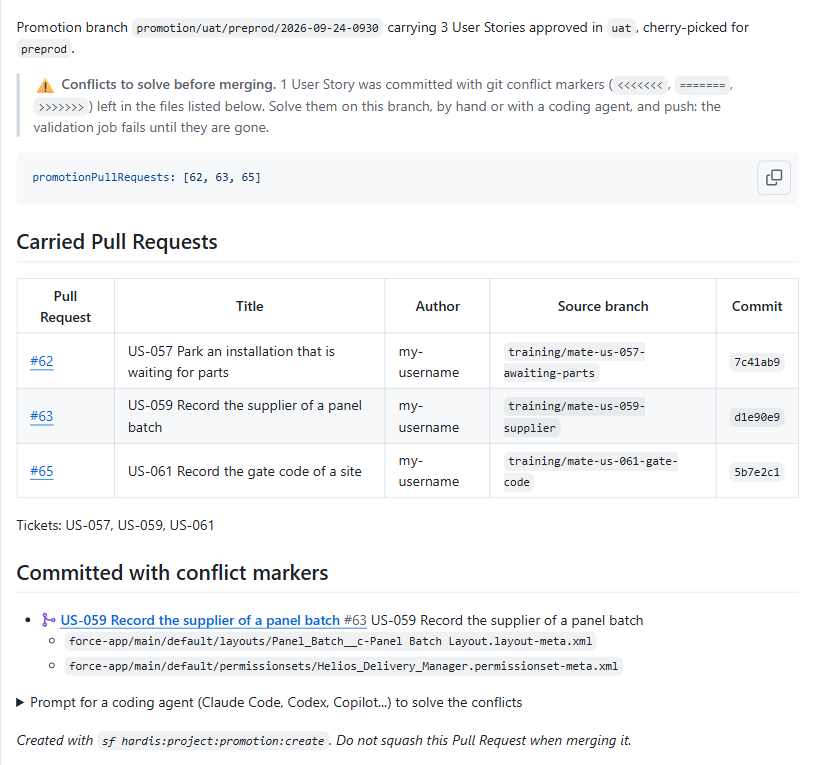
-
Read the description with the table below
-
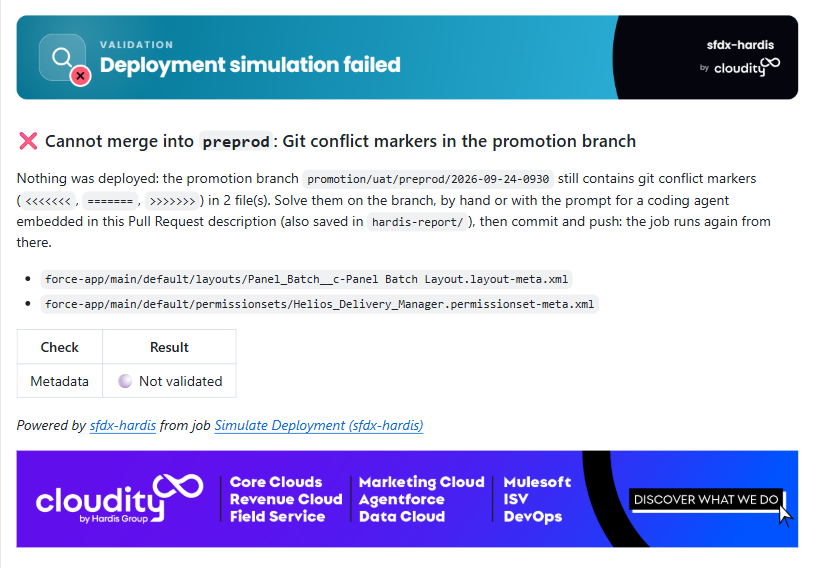
Open the Checks of the Pull Request. The Simulate Deployment to Major Org check is red, and the sfdx-hardis comment says why: its verdict reads ❌ Cannot merge into
preprod: Git conflict markers in the promotion branch, and one paragraph under it names the files:Nothing was deployed: the promotion branch
promotion/uat/preprod/2026-09-24-0930still contains git conflict markers (<<<<<<<,=======,>>>>>>>) in 2 file(s). Solve them on the branch, by hand or with the prompt for a coding agent embedded in this Pull Request description (also saved inhardis-report/), then commit and push: the job runs again from there.force-app/main/default/layouts/Panel_Batch__c-Panel Batch Layout.layout-meta.xmlforce-app/main/default/permissionsets/Helios_Delivery_Manager.permissionset-meta.xml
| Part of the description | What it is | What to do with it |
|---|---|---|
| The warning | 1 story was committed with conflict markers in the files listed | Step 6 solves them |
| The yaml block | The declaration, and every job that runs on this Pull Request reads it | Keep it, and do not hand-edit the numbers: the command wrote what it actually cherry-picked |
| Carried Pull Requests | The stories it carries. The Author column is the GitHub account that opened each Pull Request, the Title comes from the Pull Request itself | Read it |
| Committed with conflict markers | US-059 and its two files | The files of step 6 |
| The folded prompt | The whole conflict, written up for a coding agent: the branch to check out, the story and its origin commit, the two files, and the rules of a Salesforce metadata merge | Step 6 uses it, or the same text in hardis-report/promotion-conflicts-prompt-<date>.md, the report file the command panel offered you |
| The last line | Do not squash this Pull Request when merging it | Step 7 merges with a merge commit |
Why
The yaml block is how the three stories keep, in preprod, everything they would have had in an
ordinary promotion: their deployment actions run, their Apex test classes are selected, their
tickets are updated, and the release notes of preprod name the stories rather than the promotion
that carried them. Delete that block and you have a branch with some commits on it and no idea what
they are for.
The Author column is your own handle rather than Mariia's or Romain's: the teammate wrote the
commit, Simulate my teammates opened the Pull Request with your account. The branch window of the
panel shows the commit author, which is why the two disagree.
The Title comes from the Pull Request, read through the git provider API. The command requires
that connection and refuses to start without it, so a promotion behaves the same on GitHub, GitLab,
Bitbucket and Azure DevOps and every carried row names its real story. You never see the refusal
here: the extension passes its own GitHub connection, signed in since
Lab 1.2. Outside VS Code, an agent or a job has to be given the token
(GITHUB_TOKEN, in the environment or in a .env file at the repository root).
The red check is the safety net: a marker in an XML file is sometimes tolerated by git and always fatal to Salesforce, so the job stops before it deploys anything, and says so where you are looking rather than failing silently in a log.
Do: read the pipeline
- Go back to the DevOps Pipeline panel and look at the diagram. The promotion in flight is
drawn on the arrow between
uatandpreprod(1), with its Pull Request number and its red check, where the + PR chip used to be -
Read the counter on the
uatnode (2): it still reads seven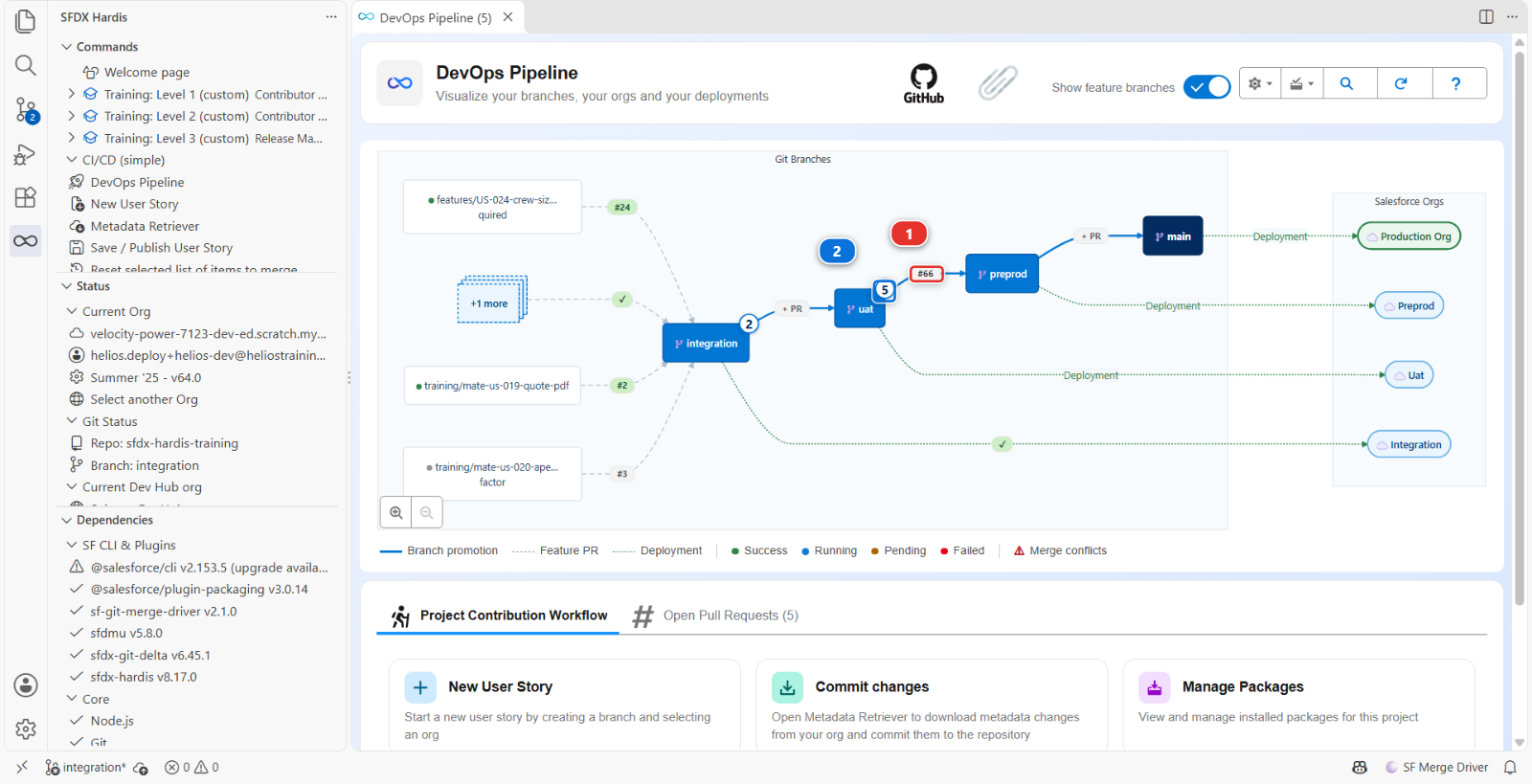
Why seven
The promotion is not a branch of your pipeline, it is something moving between two of them, and it
lives exactly as long as its Pull Request. Nothing has moved yet. The counter counts Pull Requests,
so the five stories, plus the retrofit of Lab 3.7 and the configuration of
Lab 3.8 that sit under them in the window. A promotion that is open is a proposal. Merge it, come
back, and the counter reads four, because a Pull Request appears in one place only: from then on
US-057, US-059 and US-061 are listed in the window of preprod, the branch they reached, and no
longer in the window of uat, the branch they left.
You should now see
- A red check on the promotion Pull Request, naming the two files that hold markers
- The promotion drawn on the arrow from
uattopreprod, and seven on theuatnode
6. Solve the conflict on the promotion branch
Goal in both files, the Supplier entry kept and the Warranty Years entry left out, and the check green.
The command left you on the promotion branch: the status bar, bottom left of VS Code, reads
promotion/uat/preprod/2026-09-24-0930. That is where the fix goes.
First decide what the fix is, because neither route below decides it for you. The rule the prompt gives a coding agent is the rule you apply by hand:
Keep the intent of the story while preserving everything else that exists in
preprod. A conflict usually means the story depends on another story that is not part of this promotion: in that case, bring in only the minimum the promoted story needs, never the whole other story.
The intent of US-059 is a Supplier field, on the layout and granted to managers. What it needs from US-058 is nothing: a supplier row does not need a warranty row above it to work. So in both files the answer is the same: keep the Supplier entry, and leave the Warranty Years entry out.
| File | Keep | Leave out |
|---|---|---|
| Panel Batch layout | the Supplier row, after Cost | the Warranty Years row |
Helios_Delivery_Manager permission set |
the Supplier grant, after Serial Prefix | the Warranty_Years__c grant |
Careful
Taking the Warranty Years entries in would be worse than a wrong merge: preprod has no
Warranty_Years__c field, so a layout or a permission set naming it fails to deploy.
Two ways to do it. The first is what the product recommends, the second works on any machine.
Do: with a coding agent
- Click the report file Prompt for a coding agent to solve the promotion conflicts in the bar of
the command panel: it opens
hardis-report/promotion-conflicts-prompt-2026-09-24-0931.md - Select everything in it and copy
- Open the chat of your coding agent in VS Code, Claude Code, GitHub Copilot Chat in agent mode, Codex or another, paste the prompt, and send it
- Read its report, then open the commit on the Pull Request and check that it did what the table above says: Supplier in, Warranty Years out, nothing else touched
The agent checks out the branch, reads the origin commit of the story, edits the two files, runs the marker search the prompt asks for, commits with a message that says what it kept, and pushes. An agent that brought Warranty Years in, or kept both sides, is corrected the same way you would correct a teammate: tell it, and read again.
Do: by hand, in the editor
-
Open the layout: in the Explorer,
force-app>main>default>layouts>Panel_Batch__c-Panel Batch Layout.layout-meta.xml. VS Code colours the conflict block and draws four small links above it: Accept Current Change, Accept Incoming Change, Accept Both Changes, Compare Changes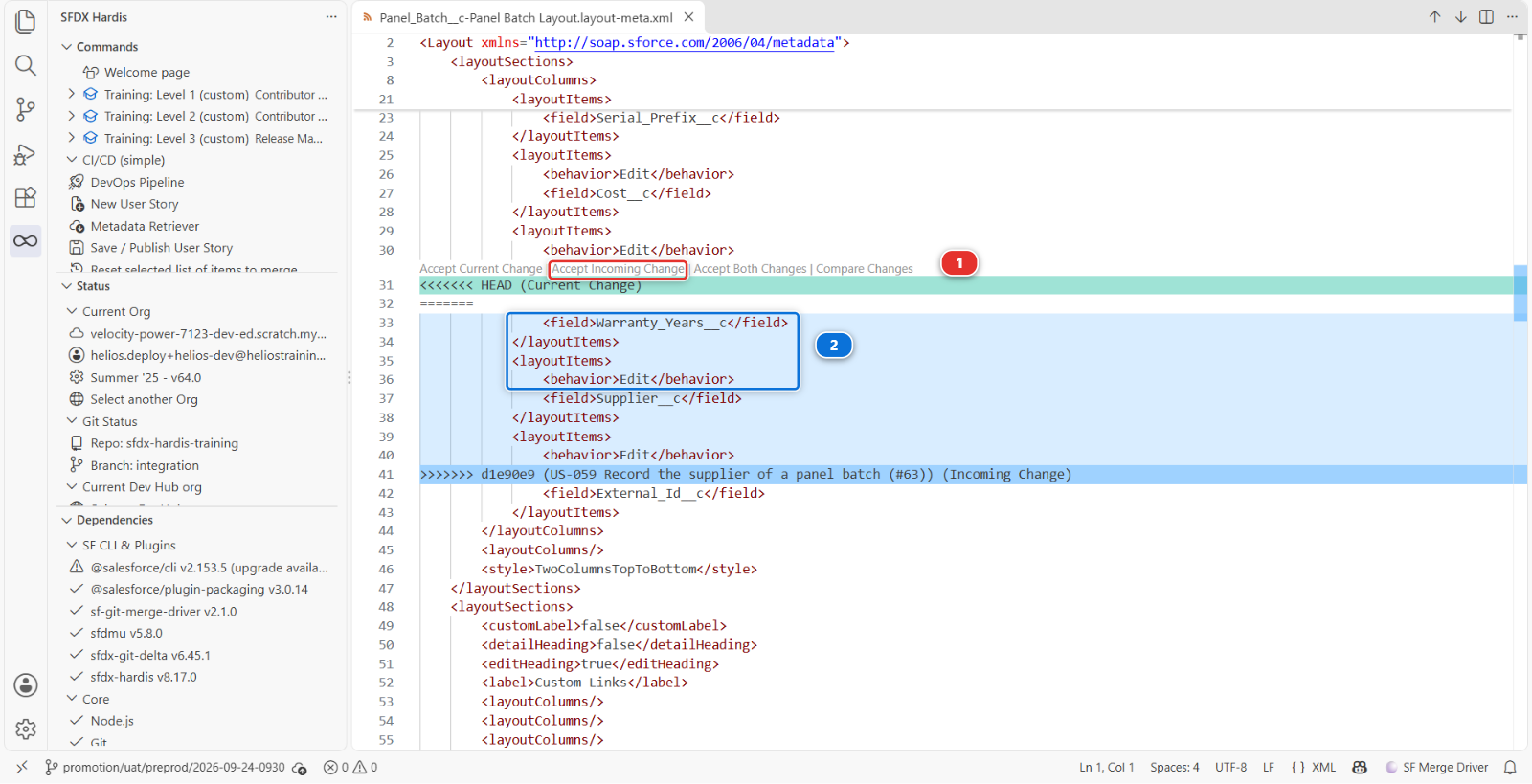
-
Click Accept Incoming Change (1): the current side,
preprod, had nothing at that spot, and the incoming side is the story. That leaves two rows where there was one conflict, Warranty Years then Supplier -
Delete the four lines of the Warranty Years row (2), so the block reads as below, and save. Copy it from here rather than typing it: nobody is asked to write XML from memory
-
Do the same in
permissionsets>Helios_Delivery_Manager.permissionset-meta.xml: Accept Incoming Change, then delete the five lines of thePanel_Batch__c.Warranty_Years__cgrant, so that the Supplier grant follows the Serial Prefix one:Edit this file<fieldPermissions> <editable>true</editable> <field>Panel_Batch__c.Serial_Prefix__c</field> <readable>true</readable> </fieldPermissions> <fieldPermissions> <editable>true</editable> <field>Panel_Batch__c.Supplier__c</field> <readable>true</readable> </fieldPermissions> <hasActivationRequired>false</hasActivationRequired> -
Search the two files for
<<<<<<<once more -
Commit from the Source Control panel, the way Lab 1.5 taught: stage the two files with their +, and write a message that says what you kept, because the reviewer of this Pull Request reads the resolution from the commit, not from the diff:
Type thisfix: solve cherry-pick conflicts of promotion/uat/preprod/2026-09-24-0930 Panel Batch layout (#63): preprod had no Warranty Years row; the story added Supplier under it; kept Supplier after Cost, left Warranty Years out Helios_Delivery_Manager (#63): preprod had no Warranty Years grant; the story added the Supplier grant next to it; kept Supplier, left Warranty Years out -
Commit, then Sync Changes to push
Do: check the green run, whichever route you took
- The push starts the check again. Wait for it to turn green
-
Open the folded ℹ️ Where the deployment actions and test classes come from at the bottom of the sfdx-hardis comment. Its first line is the one from an ordinary promotion,
ℹ️
promotion/uat/preprod/2026-09-24-0930is a promotion branch carrying 3 Pull Request(s) declared in its description.followed by what the job collected from them 3. Open the folded 🎫 section next to it. It lists the three Pull Requests, those of US-057, US-059 and US-061. On the course's own fork they are Pull Requests 62, 63 and 65; yours carry other numbers
Careful
If that line is missing, or says none of the declared Pull Requests could be used, stop and fix it before merging. It means the job did not read the declaration, and the deployment about to run is the metadata without anything that goes with it.
Under the hood: what the links do, what the job greps, and what the prompt asks of an agent
The four links come with VS Code, not with sfdx-hardis. They are drawn over any file that contains
the three markers, whether or not git thinks a merge is in progress, which is why they work on a
conflict somebody committed on purpose. Accept Current Change keeps the <<<<<<< HEAD side,
Accept Incoming Change the >>>>>>> side, Accept Both Changes both, one after the other,
and every one of them removes the markers. None of them knows that the incoming side holds two
entries and that only one belongs, which is the part you did.
The check job runs git grep for the opening and closing markers (<<<<<<< and >>>>>>>, since
a line of ======= is legitimate in markdown) over every tracked file of the branch, and stops the
deployment with the comment you read in step 5. It reads the files as they are checked out, never
the git history, so it works on the shallow clone a CI job makes. The two files of
Lab 2.7 hold markers as teaching material, so this project lists them in
promotionConflictMarkersIgnoredFiles of config/.sfdx-hardis.yml and the job leaves them alone.
The prompt asks the agent for four things a reviewer can check: touch only the files with markers,
keep the XML well formed with one entry per API name, prove no marker is left with the same
git grep, and commit with one line per file saying what the target side had, what the story added
and what was kept. "Solved conflicts" is not a line it may write. The commit message above is that
shape, written by hand.
You should now see
- The check green, with the promotion branch line and the three Pull Requests listed
7. Add the reason, merge, and verify the selectivity in the org
Goal the reason on the Pull Request, the promotion merged, and only the three chosen stories in helios-preprod.
Do
-
Edit the description and put your reason above the generated text, in a sentence the person reading this in six months can use:
Warehouse cutover on Monday needs the Awaiting Parts status in production. US-058 stays in UAT until the wording is approved, expected Wednesday next week, and US-060 until the crews have been briefed.
-
Merge with a merge commit: Create a merge commit, under the arrow of the green button
- Wait for the Process Deployment (sfdx-hardis) run on
preprodto turn green - Open
helios-preprodand check both halves of what you did, with the table below
| Where, in Setup | There | Not there |
|---|---|---|
| Object Manager > Installation > Fields & Relationships | Status offers Awaiting Parts, and there is a Gate Code field: US-057 and US-061 | No Scaffolding Required field: US-060 is not |
| Object Manager > Panel Batch > Fields & Relationships | A Supplier field: US-059 | No Warranty Years field: US-058 is not, and that is the point |
| Object Manager > Panel Batch > Page Layouts > Panel Batch Layout | Supplier right after Cost, where you put it | - |
Careful
Never a squash. The cherry-picked commits and their trailers are what the next promotion, the retrofit and the release notes all read. The How to merge line of the green check comment says it too.
Why two checks
Deployed and only what you chose deployed are two different checks, and this lab is the one where the second one matters.
You should now see
- A green deployment on
preprod, and the table above true inhelios-preprod
8. Count what it cost
Goal you can say out loud what is now true. This step has no clicks.
Look at the pipeline now:
uatholds five stories.preprodholds three of themhelios-uatandhelios-preprodare no longer the same org, and they will stay different until the next full promotion- Production is about to run a combination of metadata that was never tested as a whole anywhere:
what
preprodholds today existed in no org before this morning - The two files you solved in step 6 now say different things on
preprodand onuat, and git will notice again
Why
None of those is a bug. They are the price, and you paid it deliberately for a fixed date. The failure mode is not paying it once: it is paying it every week, quietly, until nobody can say what any of the four orgs contains.
Three habits keep it honest:
- The promotion Pull Request says why. You did that in step 7
- The promotion is retrofitted right away. Step 9, and it is not optional this week
- The exception ends. The next ordinary promotion of
uatcarries US-058 and US-060 up, and the pipeline is aligned again. Lab 3.11 is that promotion: both stories are still waiting inuaton Monday morning, and they go out with everything else
You should now see
- The four facts above, and the three habits, in your own words
9. Retrofit the promotion into integration, right away
Goal preprod merged back down into integration, while the conflict is small and you still remember what you decided.
The last bullet of step 8 is the reason for this step. On uat, the layout says "Cost, Warranty
Years, Supplier". On preprod, since your fix, it says "Cost, Supplier". When Lab 3.11 promotes
uat into preprod whole, git meets those two lines again and reports the same two files as
conflicting, on a Pull Request between two major branches that nobody may push to. The way out is
the one the promotion branches documentation prescribes after every promotion, and the one
Lab 3.7 taught after the hotfix.
Do
- New User Story, as in Lab 3.7 step 7: type Retrofit, name
US-059-retrofit, targetintegration, orghelios-dev(Scratch org, then Reuse scratch org helios-dev) - Git: Fetch then Git: Merge... from the Command Palette, as in Lab 3.7 step 8, and pick origin/preprod this time, under remote branches
- The merge stops on the same two files, which appear under Merge Changes in the Source
Control panel. Open each one with Resolve in Merge Editor, the editor of Lab 2.7, and
read the two panes: Current is
integration, with the Warranty Years entry, Incoming ispreprod, with nothing at that spot - Click Accept Current on the block, in both files, then Complete Merge. This time the answer is the opposite of step 6
- Both files land under Staged Changes with the message
Merge remote-tracking branch 'origin/preprod' into retrofit/US-059-retrofitalready written, and the blue button under it reads Continue while a merge is in progress, as in Lab 2.7. Click it - Save / Publish User Story as in Lab 3.7 step 9, and open the Pull Request into
integration, titledRetrofit: the promotion of US-057, US-059 and US-061 back down into integration - Wait for its check, and merge it with a merge commit (Create a merge commit), as the How to merge line of its comment asks
Why Accept Current
integration is where US-058 lives and where it will be approved from, so its lines stay. Nothing
else conflicts, because the three promoted stories are the same content on both sides.
Under the hood: a Pull Request that changes no file, and why it still matters
git checkout -b retrofit/US-059-retrofit origin/integration
git fetch origin
git merge origin/preprod
# keep the integration side of the two files, then commit
git push -u origin retrofit/US-059-retrofit
The retrofit brings nothing new by content: every line preprod holds, integration already had,
and the two lines it lacks are the ones you chose to keep out. What the merge commit records is that
preprod, as it stands after the promotion, has been looked at and reconciled. From then on git has
a common point for the two branches that is newer than the promotion, and the next merge between
them starts from that point instead of from the week before, when neither branch had any of the five
stories.
Without it, the promotion of uat into preprod in Lab 3.11 conflicts on the layout and
the permission set: preprod says "add Supplier after Cost", uat says "add Warranty Years then
Supplier after Cost", and git does not know that one of those was a decision. With it, that
promotion merges cleanly and carries US-058 and US-060 up the ordinary way.
The rule of thumb is the one of Lab 3.7: work flows up, and the one thing that flows down is a retrofit, done the same day as the thing it retrofits.
Under the hood: what happens to US-058 and US-060 next, and what a promotion looks like from above
Nothing special. US-058 and US-060 are User Stories merged into uat that have not been promoted,
exactly like every other story the day before a release, and the next uat into preprod Pull
Request carries them the ordinary way.
What sfdx-hardis has to be careful about is the three others, which are in both branches by
different routes: merged into uat, cherry-picked into preprod. The next promotion of uat will
bring the original commits up too, and git will merge them cleanly because the content is already
there, and because the retrofit of step 9 told it where the two branches last agreed. The pipeline
diagram and the release notes both know they were already promoted (promotedAway), so each one is
listed once, on the branch it really reached, and the notes of the next release do not announce
them twice.
The same expansion works one level up: when preprod is promoted to main, the merge commit that
arrives carries the promotion, not the stories under it. sfdx-hardis reads the promotion's
declaration and puts the three stories back in scope by name, so their deployment actions run in
production too.
You should now see
- A merged retrofit Pull Request into
integration. Its Files changed tab is empty, and that is right: the block above says why
What you should see
- A merged Pull Request titled
Promotion uat to preprod (<date>-<time>), from a branch namedpromotion/uat/preprod/<date>-<time>, with a red check turned green by one commit - A
promotionPullRequestsblock in its description naming US-057, US-059 and US-061 and nothing else, with your reason written above it - A green Process Deployment (sfdx-hardis) run on
preprod - Awaiting Parts in the Status picklist, a Gate Code field on Installation and a Supplier
field on Panel Batch in
helios-preprod, and neither Warranty Years nor Scaffolding Required there - No
<<<<<<<left in the two files onpreprod - A merged retrofit Pull Request into
integrationwith no changed file - The
uatnode of the diagram counting four Pull Requests still waiting: US-058, US-060, the retrofit of Lab 3.7 and the configuration of Lab 3.8
If it goes wrong
Simulate my teammates refuses US-059 and names US-058.
US-059 was written on top of US-058, and your integration does not hold it yet. Merge the Pull
Request of US-058 first, then take US-059 again. Step 2 gives the order for exactly this reason.
The uat window has no checkboxes and no Create promotion button.
Either the feature is off in the configuration your workspace is reading, or allowedPromotionSteps
does not name uat as a source with preprod as a target. Step 1 shows both. A step pointing at a
branch the pipeline does not merge into opens nothing, on purpose.
The command stops saying the allowed steps are missing.
allowedPromotionSteps is required as soon as enablePromotionBranches is on. It is not a default
sfdx-hardis is willing to invent: which branches a release manager may promote between is a decision
about your pipeline.
The cherry-pick of US-059 did not conflict, or conflicted on one file only.
Something solved it for you, usually the SF Merge Driver: its item at the bottom right of VS Code
shows a green circle, and a click turns it off. Open the Files changed tab of the Pull Request and look for Warranty_Years__c in the
layout and the permission set. If it travelled, the deployment fails on a field preprod does not
have: take it out on the promotion branch the way step 6 does, and push. If it did not, the
promotion is right as it is, and the retrofit of step 9 can still stop on both files.
There are no Accept links above the conflict block.
The file is open in a preview or the block is out of view. Click into the file, scroll to the
<<<<<<< HEAD line: the links sit right above it. They come from the built-in Merge Conflict
extension of VS Code, which is on unless somebody disabled it.
The check is still red after your push.
Search both files for <<<<<<<, ======= and >>>>>>>, and read the sfdx-hardis comment: it names
the file that still holds one. If it names the two files of Lab 2.7 instead, the job ran an
sfdx-hardis older than the one that reads promotionConflictMarkersIgnoredFiles: those files hold
markers as teaching material, and a current version leaves them alone.
The sfdx-hardis comment does not mention a promotion branch.
The deployment job read a configuration with the feature off. Check that preprod carries
enablePromotionBranches: true in config/.sfdx-hardis.yml: the branch the job reads is the
promotion branch, which was cut from preprod.
The command stops saying it needs the git provider connection.
The promotion is assembled from the Pull Requests of uat, and only the git provider names them
reliably, so the command refuses to guess without it. In VS Code that connection is the GitHub
sign-in of Lab 1.2, and the extension passes it on its own: sign in again if it
was revoked. An agent or a job is given GITHUB_TOKEN, in the environment or in a .env file at
the repository root, kept out of git.
The deployment is much bigger than three stories.
Look at what the branch was cut from. A promotion branch built when preprod was behind carries the
difference with it. That is a reason to promote normally more often, not a reason to build a bigger
promotion.
The retrofit merge conflicts on more than the two files.
Somebody changed something else on integration since the promotion, and the answer is the one of
Lab 2.7: keep both intents, file by file. On the two files of this lab, Accept Current is the
whole answer.
Check my work says integration and preprod still disagree.
The retrofit of step 9 is missing, or it was merged with the preprod side kept. Do it again from
New User Story, and take the Current side in the merge editor.
Check your work
Welcome page > Training: Level 3 > Check my work, then pick Lab 3.10.
It looks for the three promoted stories on preprod, for a promotion branch in its history, for no
conflict marker left in its metadata, and for integration being able to take preprod back
without a conflict. However you solved the conflict, by hand, with an agent, or in another editor,
passes.
Go deeper
- Promotion branches (Beta)
- hardis:project:promotion:create
- Retrofit, the step that follows every promotion branch
- Hotfixes, which is the right tool
for an urgent fix that was never in
uat
Next: Lab 3.11 - Capstone: run a weekly release cycle