Lab 3.5 - Promote to UAT and write the release notes
Level: 3 Release Manager
Time: ~35 min
You will: protect a setting UAT keeps for itself, make your first promotion between two major branches, read the deployment actions it carries, and produce the document the business actually reads.
The situation
Everything the team built this week is in integration. The business testers work in UAT. Monday
morning they expect to find this week's work there, with a note saying what changed.
A promotion between major branches is not a contributor Pull Request. It carries several stories at once, it may carry deployment actions declared weeks ago by different people, and the org it deploys to has real testers in it.
Before you start
- Lab 3.4 finished: US-018 and US-019 merged into
integration -
helios-uatconnected: the scratch org Level 1 created, configured as theuatorg since then -
SFDX_AUTH_URL_UATstill in your fork:uatkeeps logging in with it, as Lab 3.1 explains
Steps
1. See what you are about to ship
Open the DevOps Pipeline panel and click the integration node in the diagram. A window opens
on that branch, titled Pull Requests in integration.
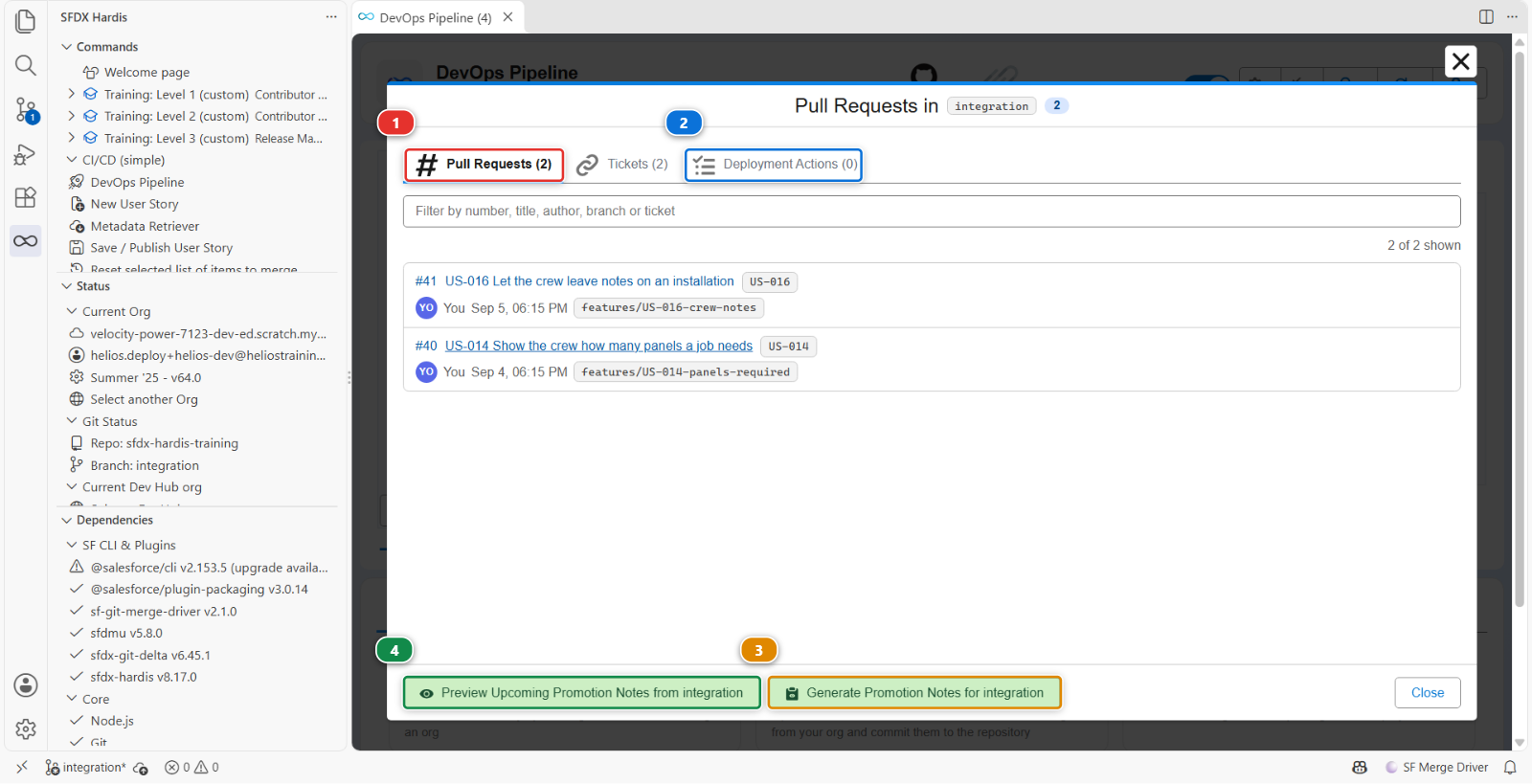
Pull Requests (1) is the list that matters: every Pull Request merged into integration
since the last promotion to uat, with who merged it and when. That list is the release. Read
it before you create anything: if a story in it should not go out this week, now is the moment, not
after the deployment.
Deployment Actions (2) is the list of actions those Pull Requests carried, gathered in one
place, and step 4 comes back to it. Tickets beside it is the same again for the stories, each with its
title, read from the backlog the project declares as its ticketing system. A fourth tab, Apex Tests, appears only on a project that sets
enableDeploymentApexTestClasses, and this one does not.
The footer holds the two buttons step 7 uses: (3) generates the notes for what has already been promoted, (4) previews the notes for what has not.
Empty, with a Go Live selector instead?
The window shows what is waiting to be promoted to the next stage. A branch that has no next
stage, meaning its mergeTargets is empty, has nothing to promote, so the panel shows a Go
Live selector (1) and the release notes of a go-live already merged into it instead:
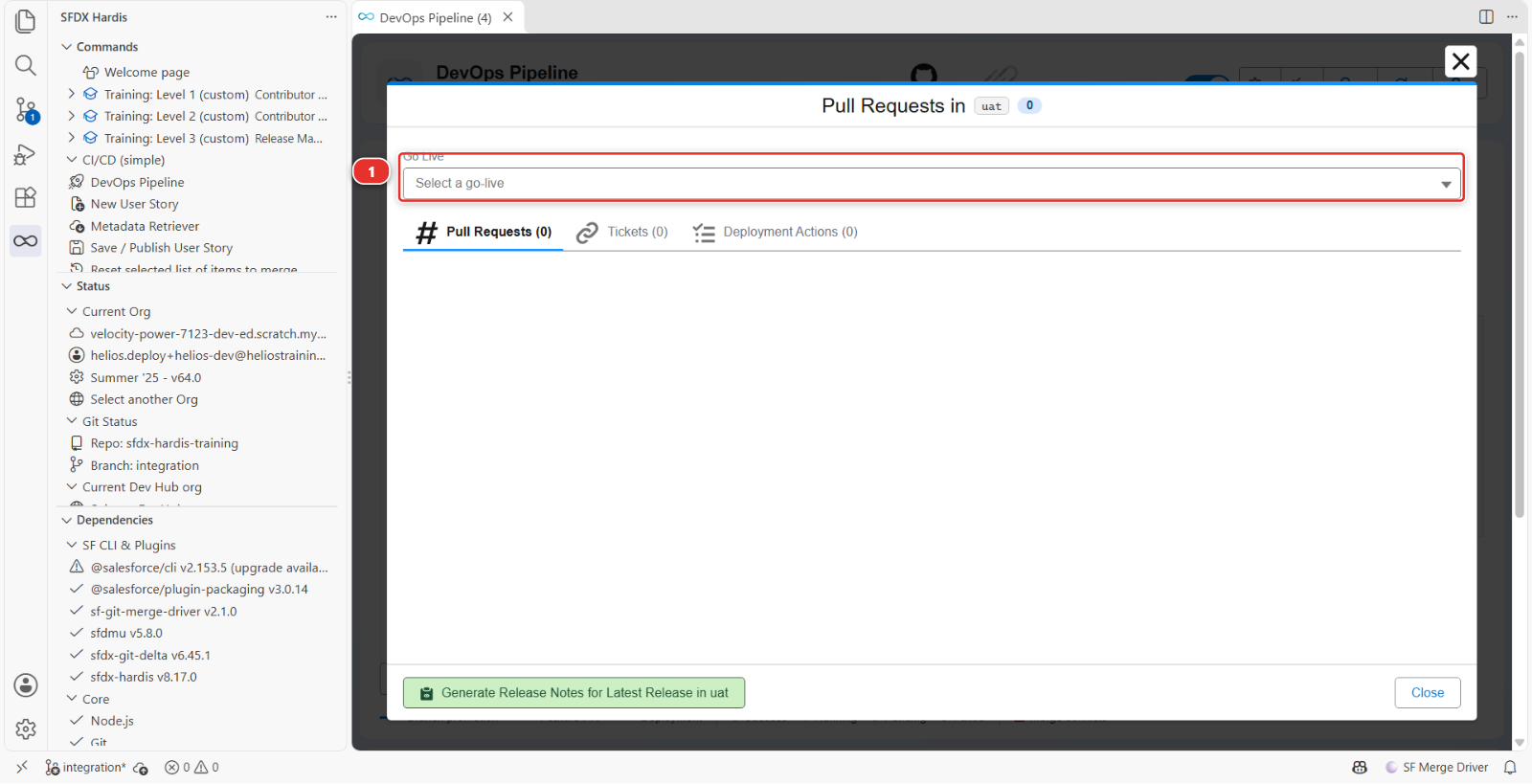
On main that is the normal view and always will be: production is the end of the pipeline.
On integration it means the branch file lost its merge target, which it has had since Lab 1.2.
Click Training: Level 3 > Set up my training environment, which writes it again. It
refreshes the org and the login URL of a file that already exists and leaves the rest alone, so
what you set in Lab 3.1 survives.
2. Protect what UAT keeps for itself
One component of the Helios app is meant to be different in every org: the remote site setting
Helios_Warehouse, the address of the warehouse stock system the panel batches are booked with.
Production talks to the real warehouse, UAT to the warehouse's test system. An admin set that address
in UAT by hand, and the repository holds the production one.
See it for yourself: in helios-uat, Setup > Remote Site Settings, open Helios_Warehouse,
Edit, and set Remote Site URL to https://warehouse-test.helios.invalid, the way
the UAT admin did. Save.
Now the promotion. It sends the whole package, remote site setting included, and would put the
production address back in UAT without a word. The overwrite manager is for exactly this:
anything listed in manifest/package-no-overwrite.xml is taken out of the deployment when the target
org already has it, and created when it does not.
Helios already has that file: it is the list every sfdx-hardis project starts with. It protects the components an org keeps for itself almost everywhere, reports and dashboards maintained in production, connected apps, named credentials, certificates. Remote site settings are not in it yet, and you do not have to write XML to add them. In the DevOps Pipeline panel, open the Deployment packages menu, the one that opened Package XML in Lab 1.5, and pick No Overwrite. The package viewer opens on that list. Turn Edit mode on (1), then click Add Type (2).
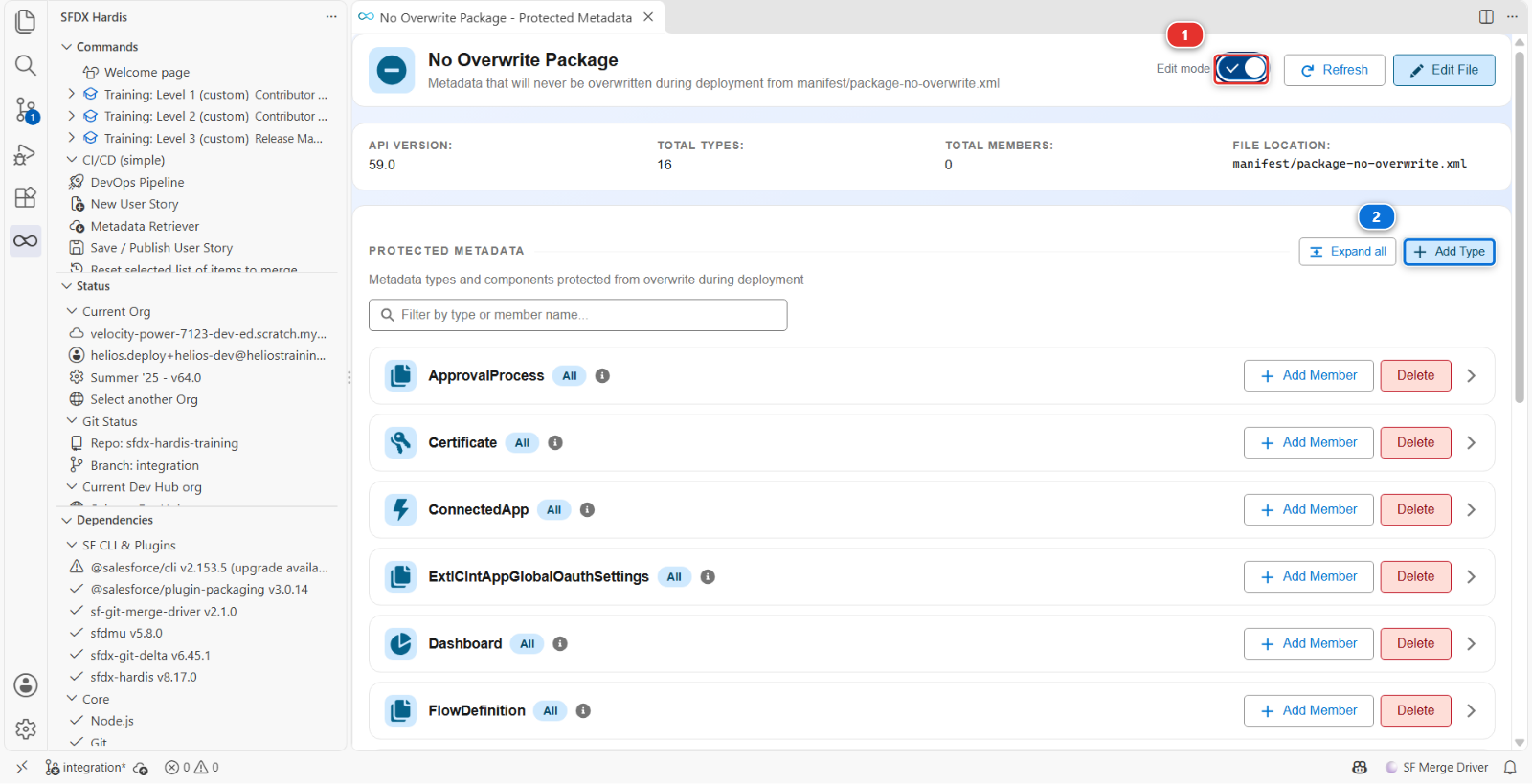
Type RemoteSiteSetting, the name Salesforce gives this kind of component, in Metadata Type API
Name (1), and click Add (2).
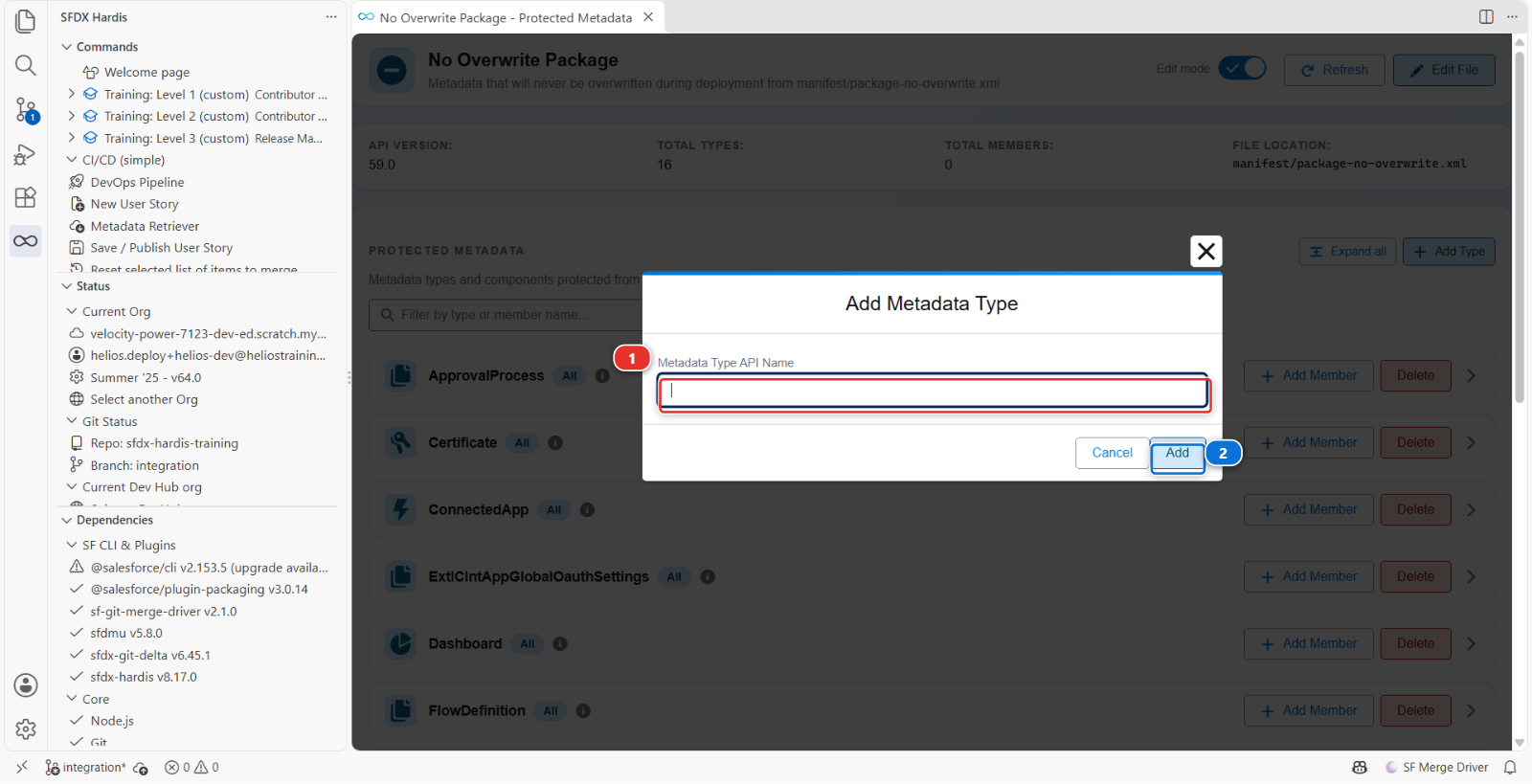
The new RemoteSiteSetting row has an Add member button: click it, type Helios_Warehouse,
and Add. The viewer added a RemoteSiteSetting block to manifest/package-no-overwrite.xml
for you. The file has the shape of manifest/package.xml: one block per kind of component, its
members listed by name, or * for all of them. Edit File opens it as text, if you want to see it.
Then Training: Level 3 > Publish my pipeline configuration, and merge its Pull Request once green, as in Lab 3.1: the list of what must never be overwritten is pipeline configuration, like the rest.
Created where missing, never overwritten where present
A new org, a fresh sandbox for instance, has no Helios_Warehouse yet, and the deployment creates
it from the repository. From then on it belongs to that org. The overwrite manager does not
compare versions: present means protected.
3. Create the promotion Pull Request
Nothing is open between integration and uat yet: the promotion Pull Request is yours to create,
now. The number in the bubble at the corner of the integration box is not a Pull Request: it
counts the User Stories waiting there, the list you read in step 1.
In the DevOps Pipeline diagram, the arrow from integration to uat carries a + PR chip
(1). Click it: GitHub opens on a new Pull Request from integration into uat, both branches
already filled in. Click Create pull request there.
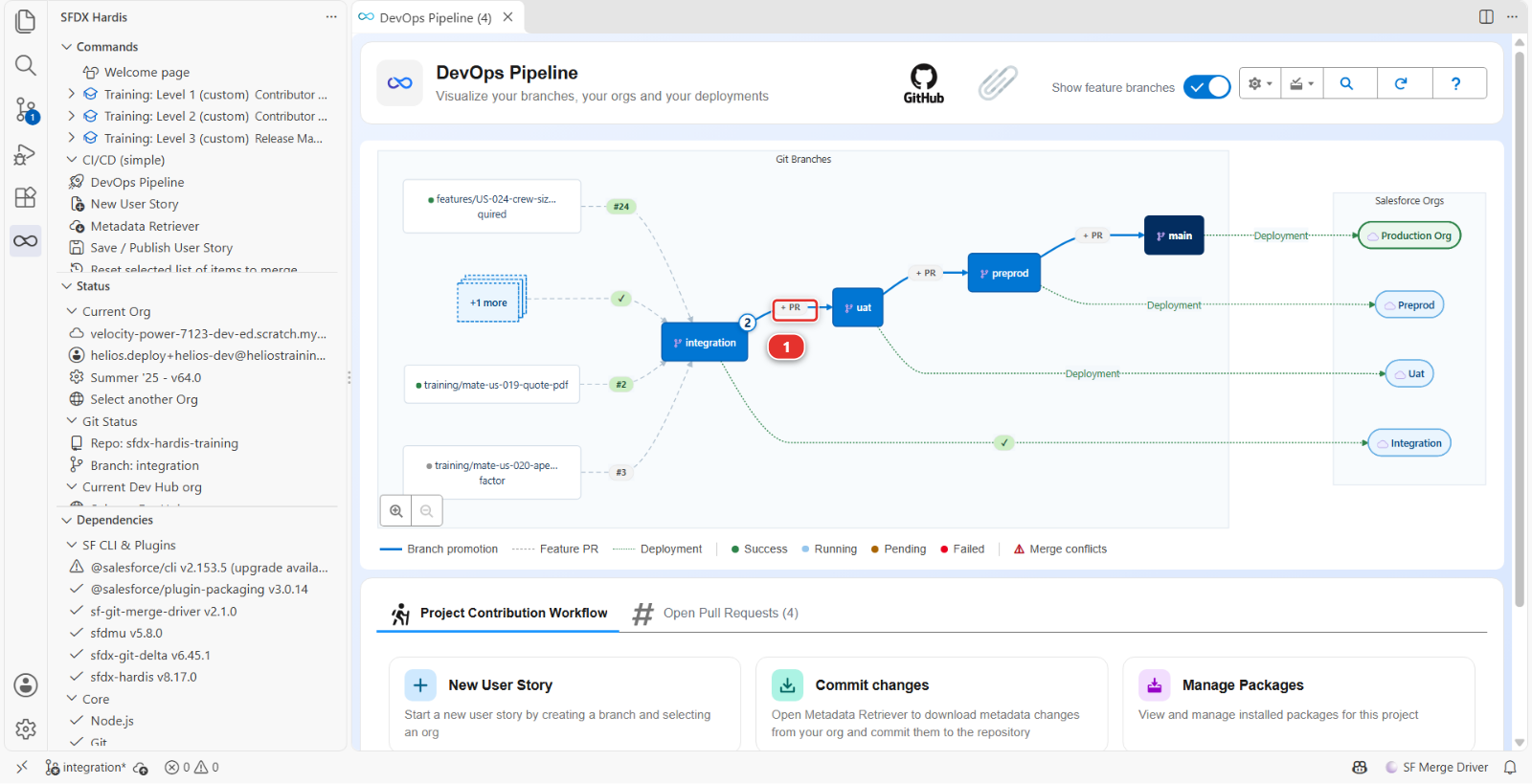
The chip is there because no Pull Request is open on that arrow. Once you create one, the chip is replaced by the Pull Request number and its status.
Not the promotion button of the branch window
A branch window can also show a Create promotion from allowedPromotionSteps allows
one step only, uat to preprod, so the window of integration has neither. You will meet
both on the window of uat in step 7.
That feature carries a subset of what is waiting, and it exists for the week the business signs off one story and not the one next to it. What you are doing here is promoting everything, which is what a plain Pull Request from one branch to the next carries, and what you should be doing almost every week. Lab 3.10 is the exception.
A story in the list should not go out?
A plain promotion carries the whole branch, so a Pull Request cannot be taken out of it. Leaving a story behind is what the promotion button of the note above is for: it creates a promotion with the stories you tick, and creating one again replaces the one already open. Lab 3.10 walks it.
Title it for the humans who will read it, not for git, and call it a promotion:
Promotion 2026-09: crew capacity cap, quote PDF
Release is the word for the Pull Request into main, production, and for nothing else. The
business reads "release" as "it is live", and a Pull Request into uat puts nothing live. Keep the
two words apart and a list of Pull Requests reads like the history of what reached production.
Merge it with Merge pull request, never with a squash: a promotion carries every commit of the stories it promotes, and the next promotion, the retrofit and the release notes all need to find them one by one (Lab 1.6). The green check comment says the same on its How to merge line: use a merge commit, never squash.
4. Read the deployment actions it carries
Once the check runs, the sfdx-hardis comment counts the actions in the Deployment actions row of its table, and lists each one in the folded 🛠️ Deployment actions of this job. What a promotion adds on top is its scope (1): the folded ℹ️ Where the deployment actions and test classes come from says they are collected from the content of this Pull Request, and the folded 🎫 ... tickets · ... Pull Requests lists every Pull Request it carries, each one a link.
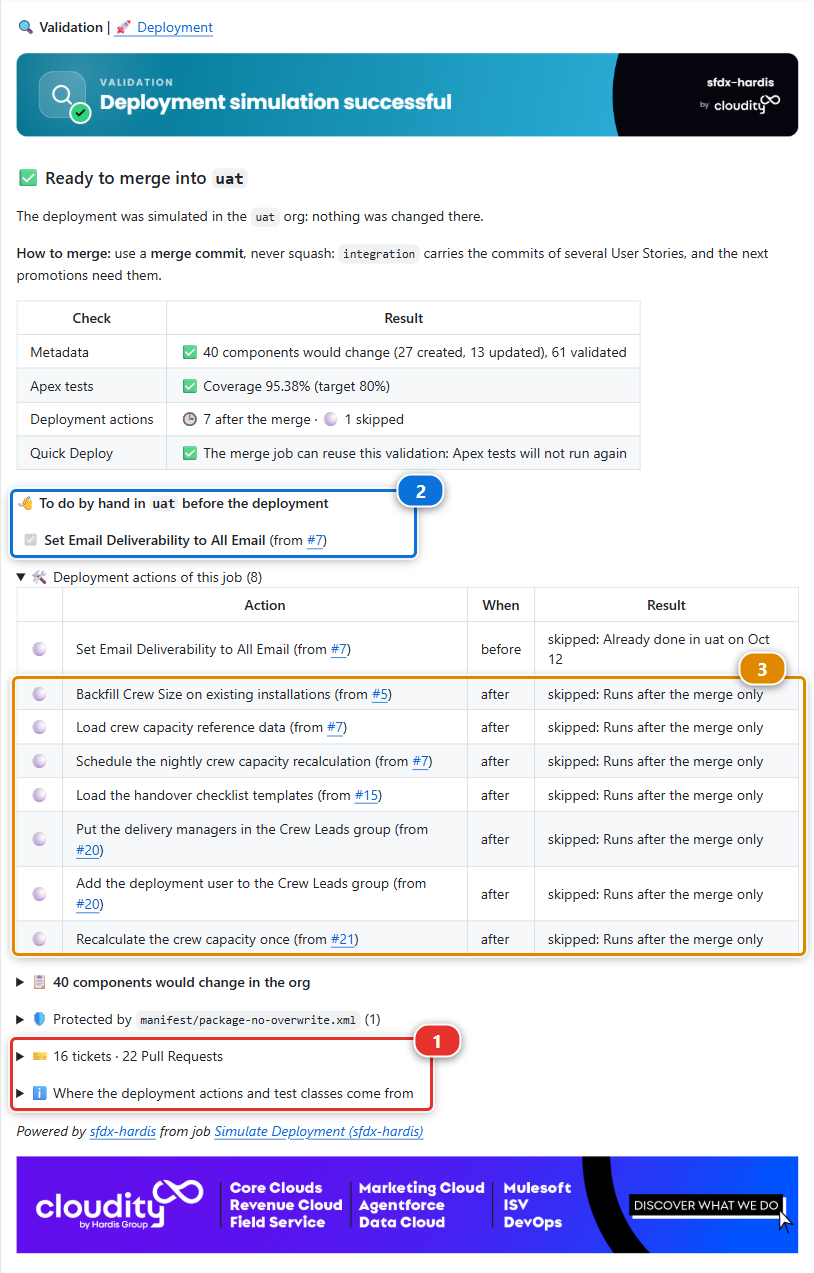
Every action any contributor declared on any of the merged stories is collected into that one
table, with its label, its moment, its result with the reason in plain words, and a link back to the
Pull Request it came from. Anything needing a human gets a checklist of its own, above the
folded sections, headed 👋 To do by hand in uat before the deployment or after the
deployment. The two checklists land on different jobs: the check job carries the before one
(2), so you can act on it while deciding, and the merge job carries the after one. The
post-deployment actions (3) are counted 🕒 after the merge on the check, with the reason
Runs after the merge only: a check changes nothing in the org, so they wait for the merge.
Read it before merging. Two things to look for:
| What you see | What it means for you |
|---|---|
| A manual step | Somebody has to click something in UAT. That somebody is you, and it will not happen unless you plan it |
| A data import | Records will be written to UAT. Testers may have their own records there |
You cannot edit a contributor's action from here: it belongs to their Pull Request and to every org after this one, so a wrong action is fixed in a new Pull Request rather than in this promotion.
The checklist is the exception, and it is not decoration. Tick a box once you have done the thing in the org, and the next sfdx-hardis job reads the box back and records the action as done. Leave it unticked and the next promotion will still be asking you for it.
A before step also holds the merge: while the deliverability step of US-026 is not marked as
done in uat, the check of the promotion stops red, right after its pre-deployment actions. Do the
click in helios-uat, tick its box (or Mark as done in uat in the VS Code Deployment
Actions tab), then Re-run all jobs on the check: it records the step and goes green.
5. Merge and watch the deployment
Merge the promotion. The Process Deployment (sfdx-hardis) run starts, this time on uat.
This is the first deployment to this org through the pipeline, so it will be larger than the ones to integration: UAT is behind by everything the team has done. Expect several minutes.
The deliverability step is a pre-deploy one: its place is before the merge, as step 4 says, and the check did not go green until you ticked it. This job skips it: Skipping Set Email Deliverability to All Email ...: already run in uat.
Then read the log for the overwrite manager, above the deployment, among the lines that start
with [NoOverwrite]:
Type RemoteSiteSetting: 1 item(s) skipped because they already exist in the target org (protected), 0 item(s) to deploy
helios-uat already has Helios_Warehouse, so the promotion left it out of the package, and the
Final package.xml to deploy printed right after it has one item fewer.
The Pull Request says it too, without the log: the comment of the check, and the one this
deployment writes, carry a folded 🛡️ Protected by manifest/package-no-overwrite.xml (1)
section. Open it: its table, Protected components per metadata type, counts 1 in the
🛡️ Not overwritten column of the RemoteSiteSetting row. Read it on the
check, before merging: a component you expected to deploy that shows up there is one the list
protects by mistake.
6. Verify with a tester's eyes
Open helios-uat and check the two stories are genuinely usable, not just deployed:
- A crew larger than the cap is brought back down to the cap when you save. The rule runs when a
planned installation gets its crew, and UAT has none left planned since the crew size backfill of
Lab 2.3, so make one: on any installation, set
StatustoPlanned,Crew Capacity Capto 3 andCrew Sizeto 6, in the same edit, and save. It reads 3, and it has moved on toScheduled - The quote PDF permission is on the manager permission set
- Setup > Remote Site Settings still says
https://warehouse-test.helios.invalidforHelios_Warehouse: the promotion left it alone
Deployed and usable are different states, and the gap between them is almost always a permission or a piece of reference data.
7. Generate the release notes
Open the DevOps Pipeline panel and click the uat node, the same way you clicked integration
in step 1. In the footer of that window, the left button now reads Generate Promotion Notes for
uat. Click it.
This window has the checkboxes and the Create promotion from uat (Beta) button the note
above mentioned, because uat is the source of the one promotion step this project allows. Ignore
both until Lab 3.10.
It asks one question, Select the merge commit for this release or promotion, listing the merges
that landed on uat, newest first. Take the top one, Merge pull request #N from
your-handle/integration: the promotion you have just merged. The notes cover what that merge
brought into uat, and nothing before it.
The button is named after what the branch is. uat merges into preprod, so what arrived there is
a promotion. On a branch with no merge target, main, the same button reads Generate Release
Notes for Latest Release in main, and once you pick a go-live in the selector at the top of the
window it reads Generate Release Notes for that go-live.
Next to it, Preview Upcoming Promotion Notes from uat does the same thing for what has not been promoted yet. It is the one to use on a Wednesday, when somebody asks what Thursday's release will contain.
You get a markdown document listing the Pull Requests, their authors, their stories and the manual
steps, generated from the merge history rather than from anybody's memory. It lands under
hardis-report/release-notes/, in a folder named after the release tag and the date, or after the
target branch and the date when there is no tag, so here uat-<date>. Markdown and PDF every time,
plus a spreadsheet when there is anything to put in it.
On this promotion, the generated notes open like this:
# Promotion Notes - uat

| Metric           | Value |
|------------------|-------|
| Pull Requests    | 22    |
| Tickets          | 17    |
| Contributors     | 1     |
| Added / Modified | 38    |
There are more Pull Requests than tickets: the configuration Pull Request of step 2 and the promotion itself carry no story, and some stories took two Pull Requests, like US-062 and its fix in Lab 3.3. The configuration of Lab 3.1 has a ticket of its own, US-050, because it went through its own story. Yours depends on how you got here: a little over 20 after walking Levels 1 and 2, far fewer after Reset this level, which starts Level 3 without their Pull Requests.
Then come a table of the tickets, one of the Pull Requests with their authors and merge dates, the
metadata changed by type, and the deployment actions with their status in uat: the manual
deliverability step success, ticked before the merge, the imports and the schedule
success.
Read it and then improve it. Generated notes are a complete list, and a release note the business reads needs two things the generator cannot know:
- One sentence at the top saying what this release is for. "Crews can no longer be over-staffed, and sales can generate quote PDFs."
- The manual steps, stated as instructions to a named person, not as a technical list
Then give them to the people who read them. Open the promotion Pull Request you merged, ... at the top right of its description, Edit, and paste the improved notes in place of the one-line description. A merged Pull Request stays editable, and it is where the release is: its link is what you send the business, and what the release notes of the next promotion point back to.
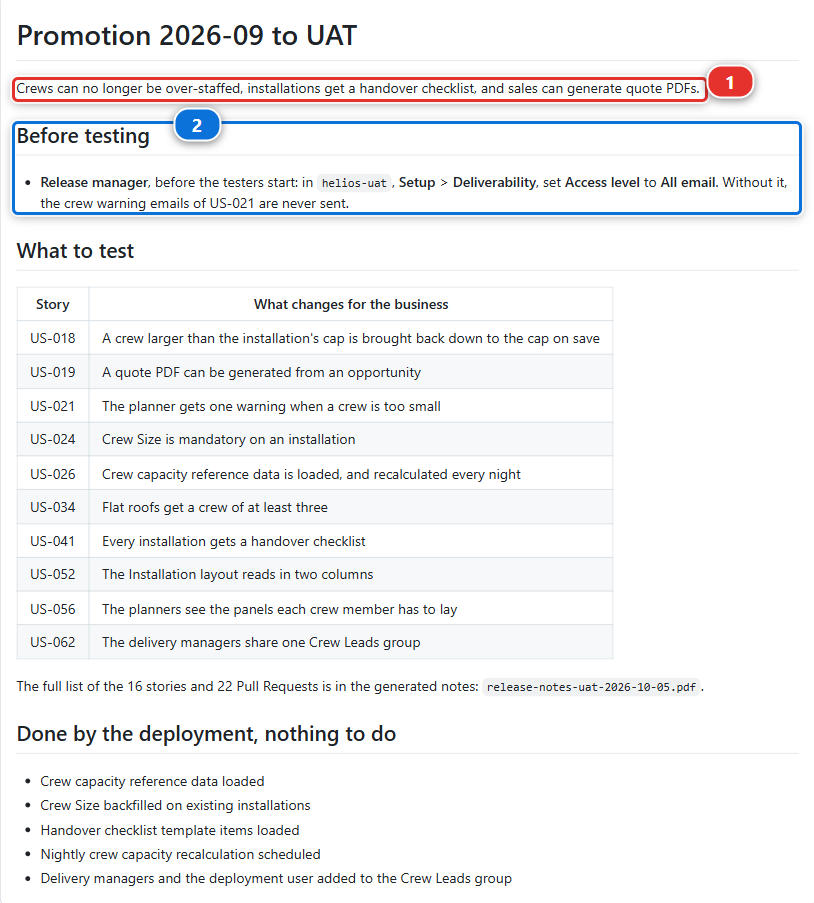
The sentence (1) says what the promotion is for, in the business's words. The manual step (2) names who does it, where, and what breaks if nobody does. The rest is a short table of what to test, and a pointer to the full generated list for whoever wants it.
Under the hood: what generated the notes, and what a promotion really is
The command was:
sf hardis:doc:release-notes --mode post --target-branch uat
which walks the git history between two references, collects the merge commits, matches each one with its Pull Request through the git provider API, and pulls the title, author, body and declared deployment actions.
That API call is the part that can quietly fail. The command needs a git provider token, taken
from the environment (GITHUB_TOKEN or CI_SFDX_HARDIS_GITHUB_TOKEN on GitHub). With no token it
does not stop: it warns, collects zero Pull Requests, and writes you a perfectly formatted document
with nothing in it. An empty release note is more often a missing token than an empty release.
This is also why a promotion is never squashed. The notes find each story from the commit its
Pull Request left on integration, a merge commit or the single commit of a squash alike: that is
why a feature Pull Request can be squashed. A promotion squashed into uat would replace all of
those commits by one that no story produced, and the notes of uat would name the promotion and
nothing it carried.
A promotion is an ordinary Pull Request. There is no special promotion machinery in the default
setup: integration into uat is a branch merged into another branch, and the deployment job on
uat behaves like the one on integration. What differs is only what the configuration says about
uat: its org, its merge targets, and whether delta deployment applies between major branches
(enableDeltaDeploymentBetweenMajorBranches, off by default, because a promotion is the worst
moment to discover the target org drifted).
There is a Beta feature for teams who have to promote a subset of what is waiting, rather than everything: promotion branches. Lab 3.10 uses it, deliberately late, because it makes sense once you have done a few releases the ordinary way.
Command documentation: hardis:doc:release-notes
What you should see
- The
uatbranch carrying everythingintegrationhad - A green Process Deployment (sfdx-hardis) run on
uat - Both stories working in
helios-uat Helios_Warehouseinhelios-uatstill pointing at the test warehouse- The release notes in the description of the promotion Pull Request
If it goes wrong
The check of the promotion is green at once, with no deliverability step to do.
Two causes. Open the folded 🛠️ Deployment actions of this job of the check comment first. When
the row of Set Email Deliverability to All Email reads skipped: Runs after the merge only,
your step of Lab 2.4 was saved with Execution Contexts on Deployment job only, and the
sfdx-hardis your check ran then left it out. Nothing is lost: do the click in helios-uat now,
merge, and tick its box in the comment of the deployment job. The current sfdx-hardis stops the
check on such a step whatever its context.
When the step is not listed at all, the actions of Level 2 travel with no Pull Request of this promotion. sfdx-hardis collects deployment
actions from the Pull Requests a promotion carries, and Reset this level puts the Level 2 stories
in integration as one commit that no Pull Request of your fork made. Its last step gives their
actions a Pull Request of your fork, Deployment actions of the earlier levels, and merges it once
its checks pass. Look for it in the Pull requests tab of your fork:
- Open with green checks: if GitHub still shows it as a draft, tick the box of Set Email
Deliverability to All Email in its check comment, the one of
integrationyou did in Lab 2.4, then click Ready for review. Merge it with Merge pull request. The promotion Pull Request takes the new commit ofintegration, and its check runs again, red this time, as step 4 says - Missing: your reset ran without that step, the case for a fork whose scripts date from before 2026-10-08. Nothing is wrong with your pipeline: go on, and steps 4, 5 and 7 show fewer actions than this lab describes. Before your next reset, run Update my course
The deployment job to uat is red on "Put the delivery managers in the Crew Leads group".
Your fork dates from before 2026-10-05, when Mariia's fix in Lab 3.3 did not ship the Crew Leads public group
yet: helios-uat has none, and her first action looks for it. The metadata is deployed, so do not
deploy again. Recover it the way Lab 3.3 taught: create the group in helios-uat (Setup >
Public Groups > New, group name Helios_Crew_Leads), then in the DevOps Pipeline panel
click uat, Deployment Actions tab, Retry on the failed action, and answer Run all the
next actions. Create the same group in helios-preprod and helios-prod before their promotions
in Lab 3.6.
The check fails with authentication errors for uat.
SFDX_AUTH_URL_UAT is missing or out of date, often because helios-uat expired and was rebuilt.
Training: Level 3 > Set up my training environment rebuilds what expired and writes the secret
again. Then Re-run all jobs on the check.
The deployment fails on something that worked in integration. The orgs differ. Usually UAT is missing a feature, a licence, or a component somebody deleted there by hand. Read the error and check the org.
The promotion Pull Request shows hundreds of files. That is expected on a first promotion: UAT is behind by the whole history. It settles after this one.
The release notes are empty. Three causes, in order of likelihood: the wrong merge commit was picked, so check that the top of the list was the promotion; no git provider token in the environment, so the Pull Request lookup returned nothing and only warned; or the merges were squashed, so there is no link to look up.
Check your work
Welcome page > Training: Level 3 > Check my work, then pick Lab 3.5.
Go deeper
Next: Lab 3.6 - Release to production and read your DORA metrics