Lab 3.3 - Read the deployment log, and what .forceignore hides from it
Level: 3 Release Manager
Time: ~45 min
You will: read a deployment log properly, review a Pull Request whose check fails on a field that is right there in its diff and find the file that hides it, then recover post-deployment actions that failed after a merge, without deploying again.
The situation
Merging Mariia's layout fix started a deployment job. Most people watch the colour and move on.
A release manager reads it, because the deployment log is the only place that says what actually reached the org, and the difference between that and what you thought you were shipping is where incidents come from.
Before you start
- Lab 3.2 finished: Mariia's layout fix merged into
integration
Part 1: read the log
1. Open the job
Actions tab of your fork (your own copy of the course repository on GitHub, for example github.com/my-username/sfdx-hardis-training), the Process Deployment (sfdx-hardis) run that started when you
merged.
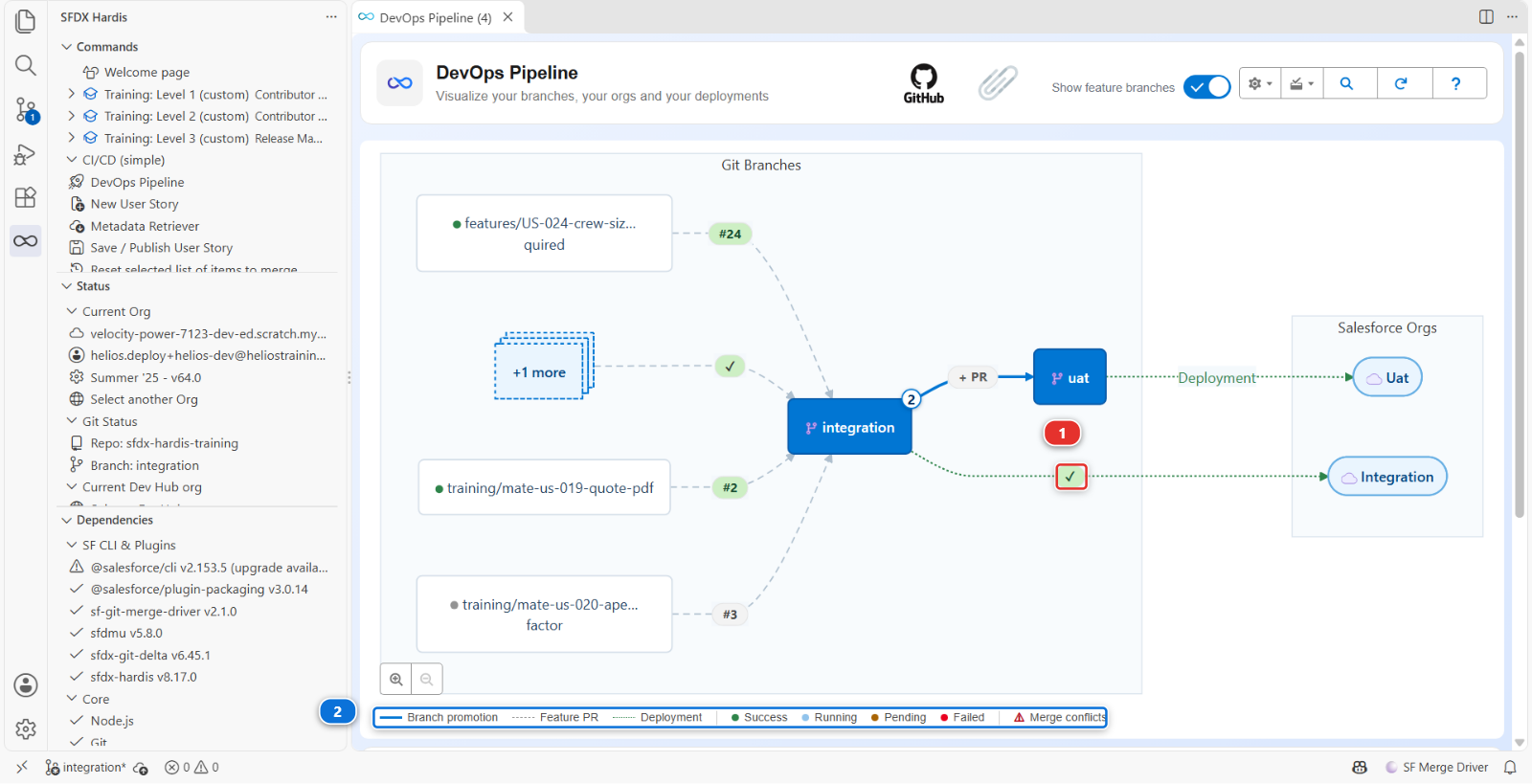
Or from VS Code: the DevOps Pipeline panel puts the job on the arrow between integration and
its org (1), coloured with its status, and the legend under the diagram (2) says what each
colour means. Click the marker to open the run.
2. Read it in five parts
An sfdx-hardis deployment log has the same shape every time:
One: authentication. Which org, which mechanism. On integration it says auth URL: the
shortcut of Level 1, which Lab 3.1 left in place. On preprod and main it says JWT. If it ever
says something else, something changed that you did not change.
Two: what to deploy. The package it computed, and where from. This is the interesting part and step 3 is about it.
Three: pre-deploy actions. Anything declared to run before, with its result.
Four: the Salesforce deployment. Components deployed, tests run, coverage, duration. On a merge
job, look for Deployment mode: FULL + Quick Deploy. The check job of your Pull Request already
validated this exact package, tests included, and the merge job asked Salesforce to apply that
validation rather than deploy again. That is why it takes seconds, and why it runs no test itself.
Five: post-deploy actions, then the notification.
3. Understand why the package is bigger than the diff
You changed one component. Now read what the job actually sent.
Open the package: DevOps Pipeline panel, Deployment packages menu, Package XML. It lists
the whole Helios app, a few dozen components, and that is the package: on this project every deployment to integration sends all of it, whatever the diff
said. The log's count of components sent will say so.
That is the default, and it is worth feeling once before you learn the thing that fixes it.
Delta deployment. Instead of sending the declared package, sfdx-hardis computes what changed between the commit already deployed to this org and the new one, and sends only that. A full Salesforce deployment of a mature project takes 40 minutes; a delta takes 3. The trade is that the org has to genuinely be at the commit the pipeline thinks it is at.
This project has delta off, on purpose
useDeltaDeployment is absent from config/.sfdx-hardis.yml, so every deployment in this
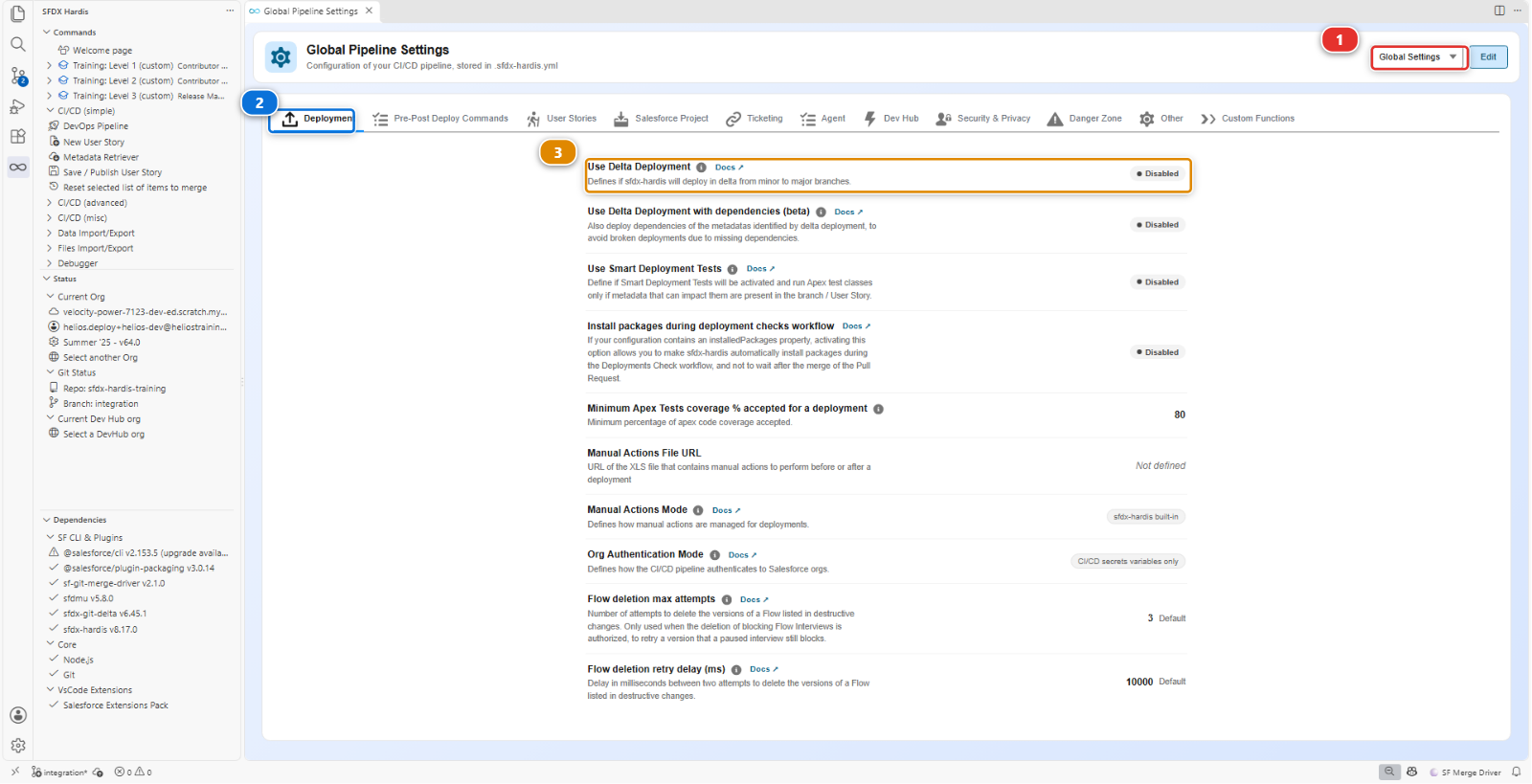
course sends the full package. Read it for yourself: DevOps Pipeline, gear menu,
Pipeline Settings, scope Global Settings (1), Deployment tab (2).
Use Delta Deployment (3) shows Disabled.
The Helios app is about sixty components by now, so a full deployment costs a minute and delta would save
nothing while adding a way for the course to fail confusingly on a missing dependency. Turn it
on when a deployment starts costing you real time, which on a real project is soon. There is a
second key for promotions between major branches,
enableDeltaDeploymentBetweenMajorBranches, on the Danger Zone tab, and it is off by
default for the same reason: a promotion carries more, and is the riskiest place to send less.
Find the line Components: N deployed in the log, under Deployment summary. On a standard run of
this course it is about sixty. Compare it with the one file of your Pull Request. The gap
is the cost of having delta off, and it is the argument for turning it on.
4. Know what Smart Deploy is, and what it is not
"Smart Deploy" is the name of the command, not of a filter. sf hardis:project:deploy:smart is the
orchestrator: it decides the package, reuses a validated deployment as a Quick Deploy when it can,
runs the pre and post deployment actions, translates Salesforce errors into advice, and writes the
Pull Request comment. It is smart about the job, not about comparing your repository with the
org component by component.
Two things are often assumed to be part of it and are not:
- Nothing compares each component with the org and drops the identical ones. There is an opt-in
mechanism that does something close,
manifest/packageDeployOnChange.xml, and it only ever looks at the components listed in that file. The file does not exist in this project, and it does nothing unless it does - Cleaning is not a deployment filter. It ran on a contributor's machine, at commit time. Step 3 of the under the hood section below is about that
So the honest answer to "why did it deploy sixty components to change one" is: because nothing was configured to stop it. That is a decision this project made, not a thing the tool does for you.
5. Verify in the org, not in the log
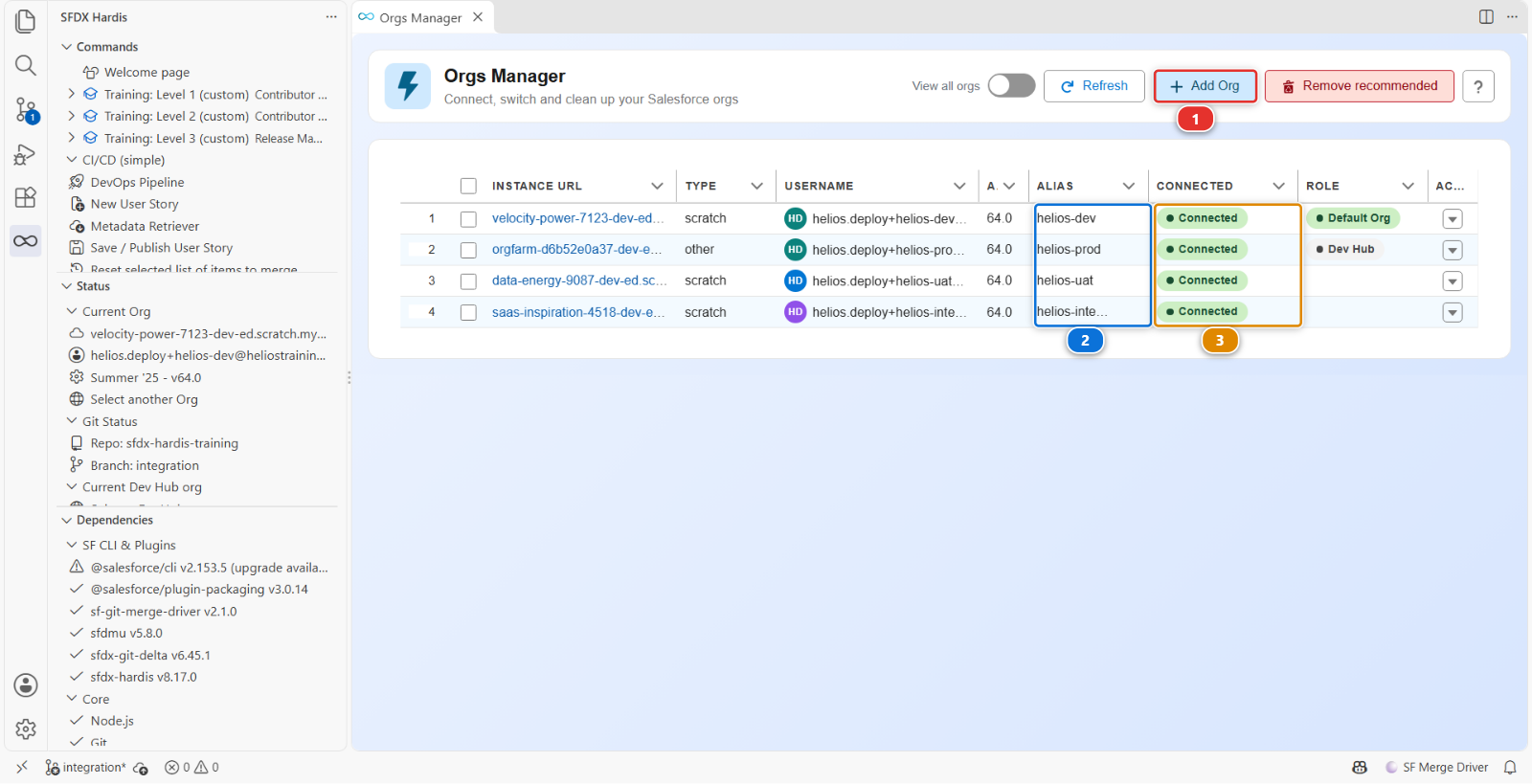
Open helios-integration from Orgs Manager: find it by its alias (2), check it still says
Connected (3), then Open from the actions menu at the end of its row. If it says
disconnected instead, that same menu offers Reconnect, and Add Org (1) is how you
connect an org the table does not have at all.
Check your change is actually there: open an Installation record, and Total Capacity (kW) is back on the layout, in the right-hand column beside Mariia's cap field.
A log is a claim. The org is the fact. On a real project you check the org after every deployment to a major environment, and it takes thirty seconds.
Part 2: what .forceignore hides
6. A Pull Request that fails on a field it carries
Romain has a story for the planners. Training: Level 3 > Simulate my teammates, and pick
US-056 Show the panels each crew member has to lay. It opens his Pull Request into
integration.
Wait for its checks. The deployment check fails, and the sfdx-hardis comment names a field:
Installation__c-Installation Layout In field: field - no CustomField named Installation__c.Crew_Workload__c found
Now open Files changed. Crew_Workload__c.field-meta.xml is there, in the diff. The field is in
the Pull Request, and the deployment says it does not exist.
7. Find what the deployment never saw
When a component is in the branch and not in the deployment, the first file to open is
.forceignore. It tells the Salesforce CLI what to ignore when retrieving and when deploying,
and a component it matches is invisible in both directions, with no error and no warning.
Romain's diff changes it too:
# My scratch test fields, never versioned (Romain)
**/objects/Installation__c/fields/Crew_W*.field-meta.xml
That line is a pattern, not a file name. The * stands for any text, so it matches every field on
Installation whose name starts with Crew_W: his scratch test field, and Crew_Workload__c, the
field of his own story. The deployment left it out, the layout and the permission set that use it
reached the org without it, and Salesforce refused them.
.forceignore is a project-wide file, and the release manager's to guard: one careless line in it
changes what every deployment sends, for everybody, from then on.
8. Send it back with the fix named
Leave one review comment on the .forceignore line of the diff:
This wildcard also matches
Crew_Workload__c, the field of this story, so no deployment ever sends it. Name your test field exactly, with no*, so nothing else can match by accident.
An exact path ages badly too, but it ages loudly: the day the file disappears, nothing else starts being ignored.
Romain answers: Simulate my teammates > US-056 Romain names his test field exactly in .forceignore. It adds his commit to the same Pull Request, the check runs again, and it goes green. Read the diff of his new commit, then merge.
Under the hood: where the package comes from, and where cleaning really happens
The job ran:
sf hardis:project:deploy:smart
and the package it sent was built like this:
- Start from
manifest/package.xml, the declared package, plusmanifest/destructiveChanges.xmlfor what is being removed - Delta, if
useDeltaDeploymentis on:sfdx-git-deltacomputes the changed components between the last deployed commit andHEAD, and everything else is taken back out of the package.enableDeltaDeploymentBetweenMajorBranchescontrols whether the same applies to a major-to-major deployment, and is off by default because a promotion to production is the worst possible place to discover that the org drifted - The overwrite manager, when the package holds something
manifest/package-no-overwrite.xmllists: the org is queried, and any component listed in that file that the org already has is taken out. When nothing in the package matches the list, the org is not queried at all, and the log says so. It is scoped to its own list and nothing else, and a component it protects is still created in an org that does not have it yet - Deploy-on-change, if
manifest/packageDeployOnChange.xmlexists: those components, and only those, are retrieved from the org and compared, and the unchanged ones are dropped
Steps 2 and 4 are off in this project. Step 3 runs, and its [NoOverwrite] lines are in the log, but
none of what Helios deploys is in its list yet, so what Salesforce receives is step 1.
Cleaning is not in that list, and this is the thing to take away. The autoCleanTypes rules run
inside sf hardis:work:save, on a contributor's machine, before the commit. They rewrite the files
on disk and commit the result, which is why Lab 1.5 could show you the diff they produced. By
the time a deployment runs, there is nothing left to clean: the repository already is the cleaned
version.
Two failure modes worth recognising:
- The org drifted. Somebody changed something in the org by hand and the deployment overwrites it without a word, because nothing compared. Lab 3.7 is about that
- Delta lost a dependency. Your change needs a component that did not change, so the delta does
not carry it, and the deployment fails on a reference. The fix is not to disable delta: it is to
include the dependency, which
manifest/package.xmlis for
Command documentation: hardis:project:deploy:smart, hardis:work:save
Part 3: when a post-deployment action fails
9. Merge a Pull Request whose actions fail after the merge
Mariia has a story made of deployment actions and no metadata. Training: Level 3 > Simulate
my teammates, and pick US-062 Put the delivery managers in a Crew Leads group. It opens her
Pull Request into integration, with three post-deployment actions in its actions file:
- Put the delivery managers in the Crew Leads group, an Apex script
- Recalculate the crew capacity once, a Run Batch action
- Add the deployment user to the Crew Leads group, an Apex script
Its check goes green. That proves less than it looks: the three actions run during the deployment job only, after the merge, so the check skipped them. Merge it.
The deployment job goes red. The metadata deployed, then the first action failed, and sfdx-hardis stopped there: the two others never ran.
10. Read what failed, and what did not run
The job log names the failure. The Apex script asked the org for a public group named
Helios_Crew_Leads, and the org has none:
Mariia created the group by hand in her own org, in Setup, the way most people create one: nothing in her Pull Request creates it.
The deployment comment of her Pull Request opens on ❌ Deployed to integration, but an
action failed after the deployment: the org has the new metadata. Under ❌ Failed action it
shows the end of the script output, and under ⏸️ Not run, waiting for the failed action the two
others.
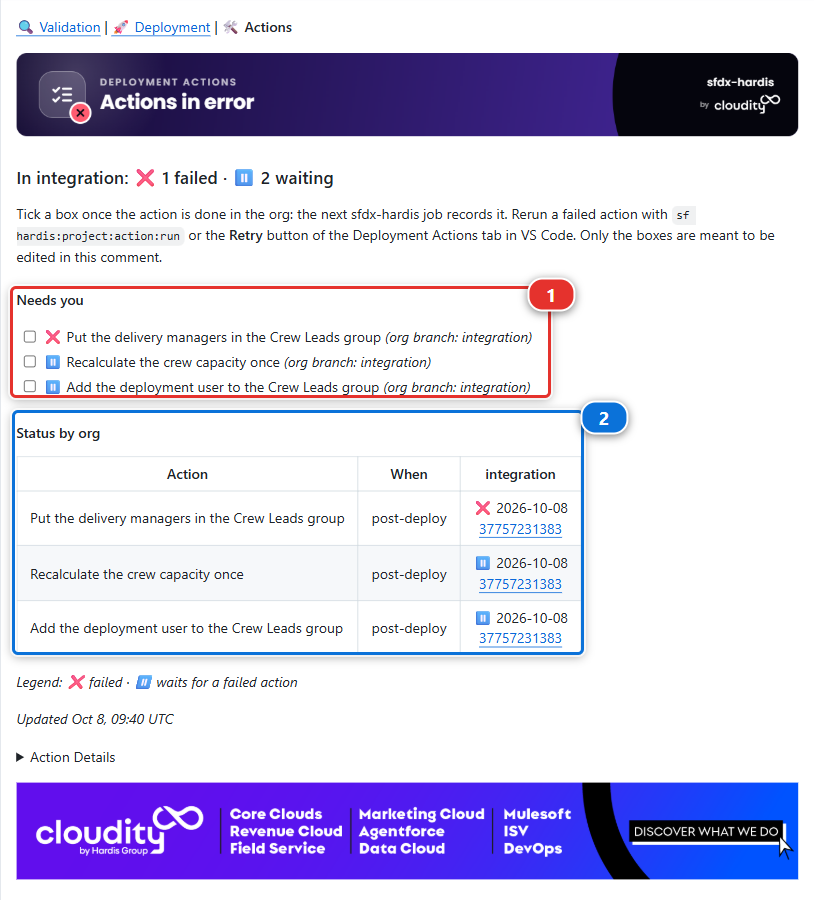
The Deployment Actions comment of her Pull Request sums it up in its verdict, In integration:
❌ 1 failed · ⏸️ 2 waiting, and lists the three actions under Needs you (1): ❌ for the one
that failed, ⏸️ for the two it stopped, each with a checkbox. The Status by org table (2)
says the same in the integration column.
The DevOps Pipeline needs two things from you first. Check out integration and pull it, from
the branch name in the status bar and the Source Control panel: the panel reads the actions from
the branch you have checked out, and Mariia's actions file reached integration with her merge.
Then click Refresh in the top bar of the panel, so it reads the deployment that just failed.
Now click integration, then the Deployment Actions tab. The actions are
grouped by Pull Request, numbered in the order they run. The Status column (1) gives each
action its state in the org of integration, and the failed one carries Retry and Mark as
done in integration buttons (2). The menu at the end of each row holds the rest, Move to my Pull Request
included.
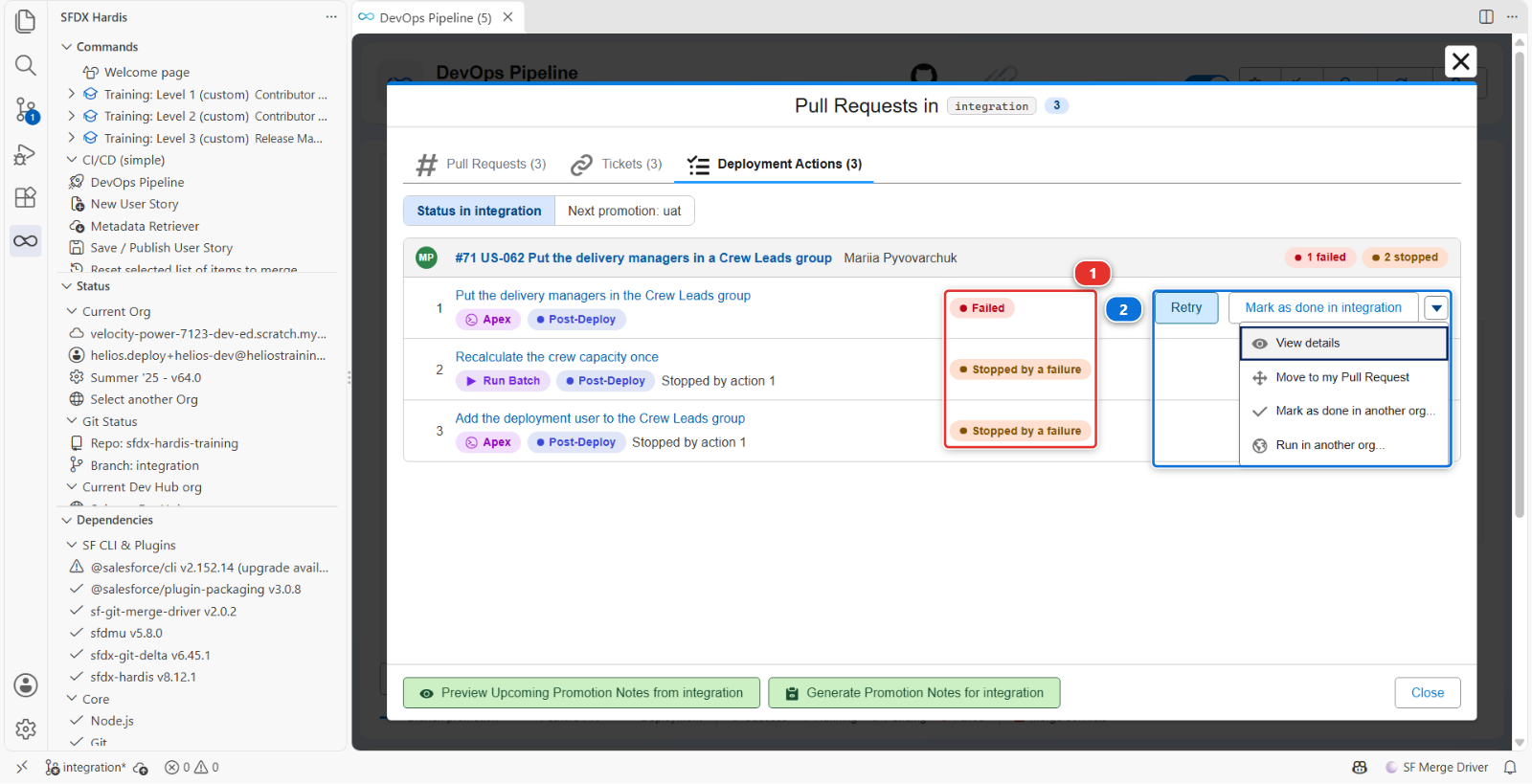
None of them runs the deployment job again: the metadata is in the org already, and a second deployment would only redo what worked. The right way out depends on why each action failed:
| Why it failed | Way out |
|---|---|
| The org was missing something, and now it has it | Retry |
| The action itself is wrong | Move it to a fix Pull Request |
| Somebody already did it by hand | Mark as done |
11. Fix the org, then retry
The first action is right: the org is missing its group. Create it in helios-integration:
- Open
helios-integrationfrom Orgs Manager, then Setup, typePublic Groupsin the Quick Find box, and click New - Label
Crew Leads, Group NameHelios_Crew_Leads, then Save
The action definition is read from the branch you have checked out, which is why step 10 had you
check out integration and pull it. If you switched branch since, come back to it.
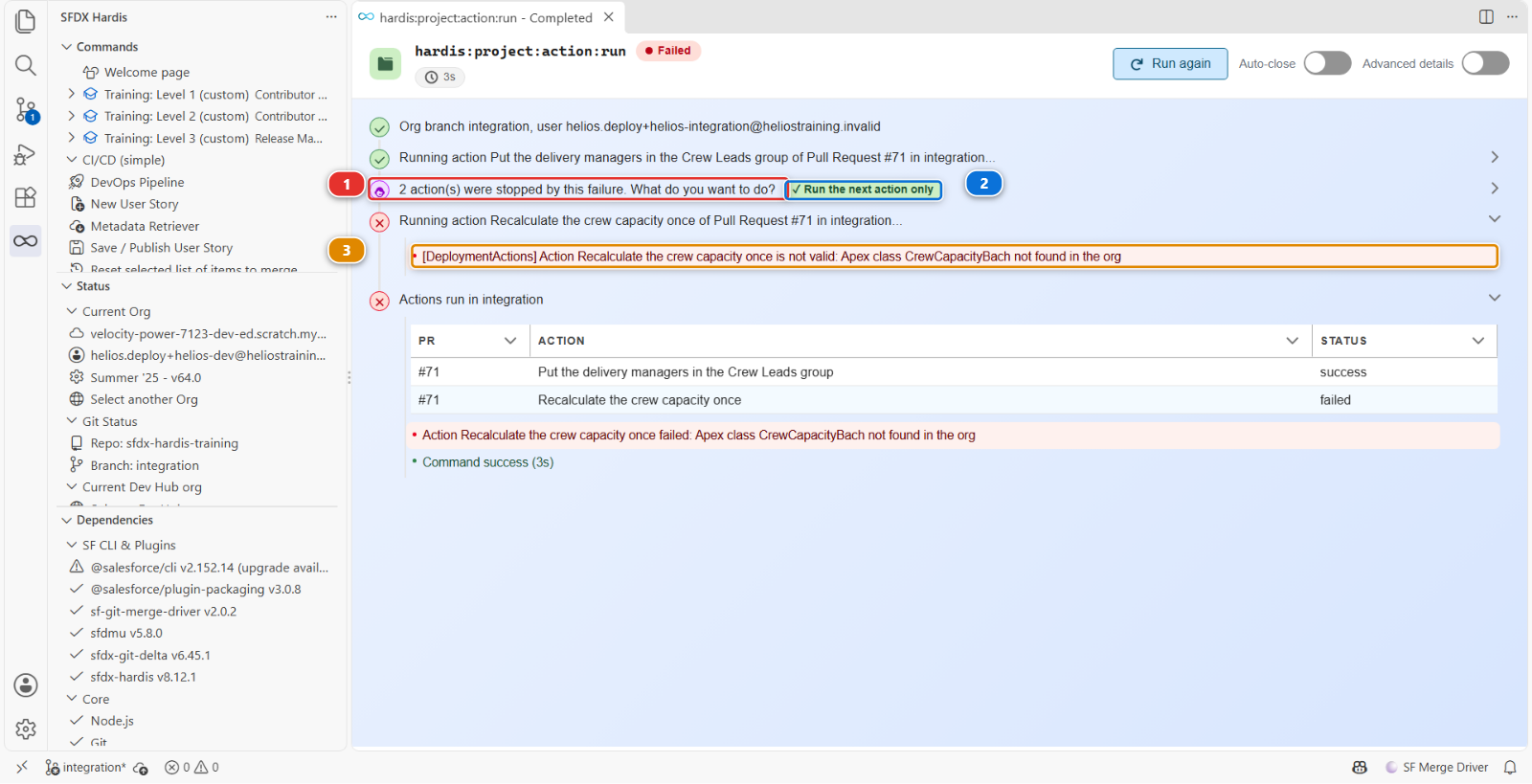
Back in the Deployment Actions tab, click Retry on the row of Put the delivery managers in
the Crew Leads group. The command runs in VS Code, against helios-integration:
- the action runs and goes green, and the command asks what to do with the two actions its failure stopped (1)
- answer Run the next action only (2)
- the crew capacity action runs, and fails (3): the class
CrewCapacityBachdoes not exist
The Pull Request comment now reads ✅ for the first action, with a note saying you ran it from your computer, ❌ for the crew capacity action, and ⏸️ for the last one.
Under the hood: what Retry ran
The button ran:
sf hardis:project:action:run --pr <number of US-062> --action-id <id> --org-branch integration
- No deployment. It runs the one action, with the code a deployment job uses for each action: target branch filters, references to the outputs of other actions, validity checks
- The org comes from the branch.
integrationnameshelios-integrationthrough thetargetUsernameofconfig/branches/.sfdx-hardis.integration.yml, and the command uses that org as you connected it in Orgs Manager. Thesfcommands the action starts target it for this run only: your default org does not change - The result goes to the Pull Request comment, with your git user name and your Salesforce username in the note, through the git provider token VS Code holds. Without one, the command refuses to run, because the next deployment would not know the action was done
- The stopped actions are remembered. When the deployment job stopped, it recorded the two
others as
not-run, linked to the failed one: that is how the command knew what to offer next - An action with a
customUsernameruns as that user. When your computer is not connected with it, the command asks you to log in with it, and checks you did
Command documentation: hardis:project:action:run
12. A wrong definition goes back to its author
Retrying the crew capacity action will fail every time: its class name has a typo, in a file of a
Pull Request that is merged. Editing that file on integration would not help either: a deployment
only reads the actions of the Pull Requests it deploys.
Send it back. Comment on Mariia's merged Pull Request:
The crew capacity action names
CrewCapacityBach, which does not exist: it should beCrewCapacityBatch. Can you move it to a fix Pull Request?
She fixes it the way the product offers: from her new branch, Move to my Pull Request in the menu of the failed row moves the action into the actions file of her own Pull Request, with the same id, and she corrects the class name there.
Simulate my teammates > US-062 Mariia fixes the crew capacity action. Review her Pull Request:
- Files changed: the action left the actions file of US-062 and arrived in the file of the new
Pull Request, with
className: CrewCapacityBatchandmovedFromset to the number of US-062 - still in Files changed: a new file,
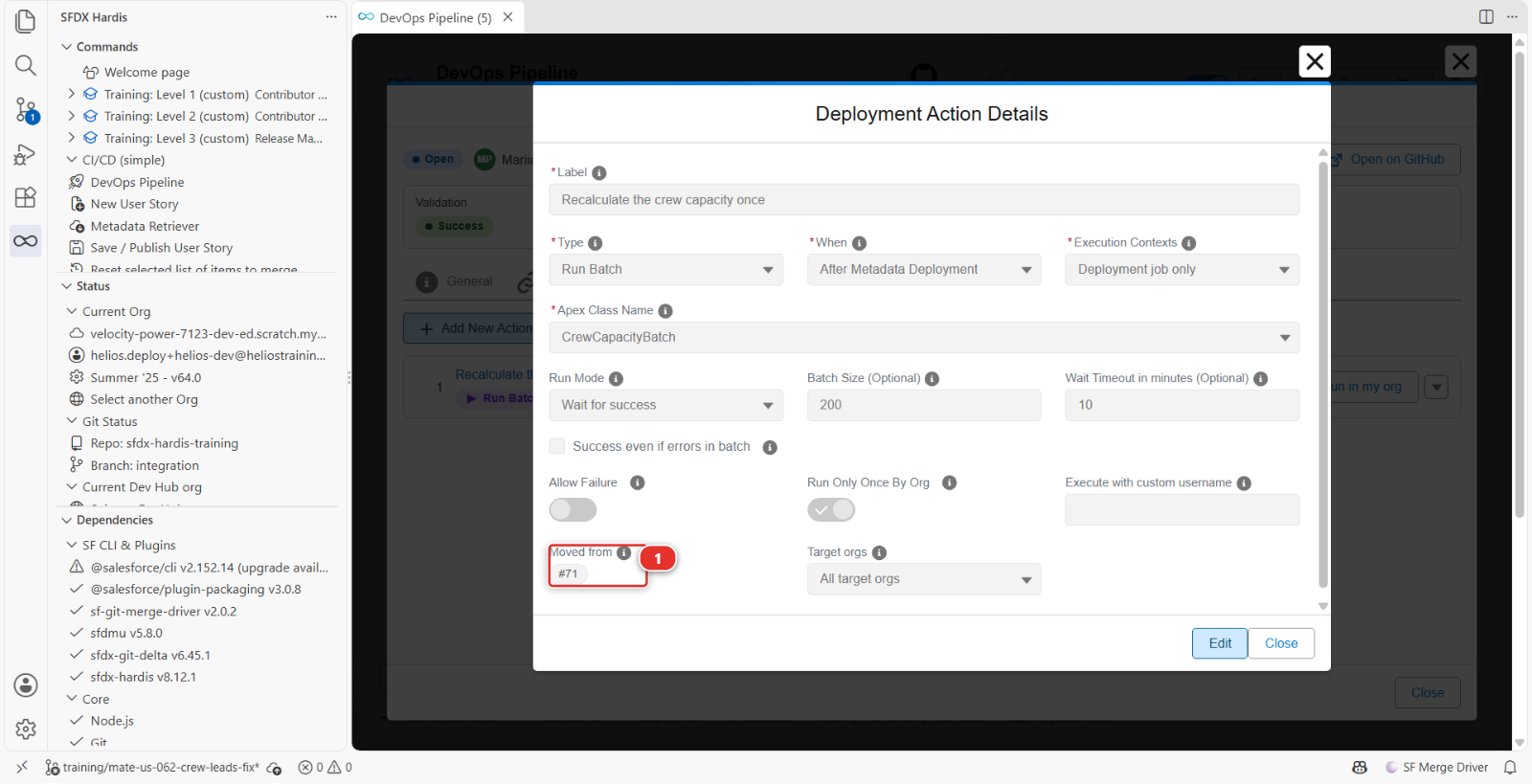
groups/Helios_Crew_Leads.group-meta.xml, and one more block inmanifest/package.xml. A public group is metadata like any other, and Mariia put hers in the sources. Inintegrationthe deployment finds the group you created in step 11 and keeps it, under the labelCrew Leads. Inuat,preprodand production, where nobody created anything, the deployment creates it before the actions run. Without that file, the first action would fail in each of them the way it failed here - the Deployment Actions tab of her Pull Request: open the action, and the editor shows where it comes from, under Moved from (1)
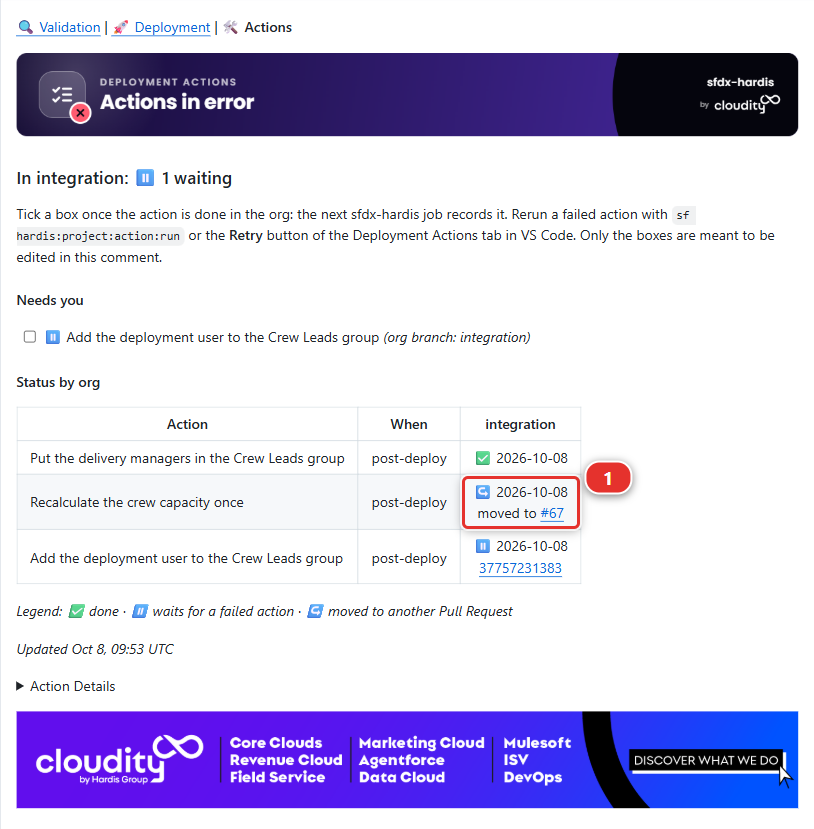
Merge it. Its deployment job runs the action, from the new Pull Request, and goes green. Open the Deployment Actions comment of US-062 again: the crew capacity action reads ↪️ moved to the fix Pull Request (1), with a link, instead of a red cell nobody could clear.
When both Pull Requests go to uat together, in Lab 3.5, US-062 no longer carries the action, and it
runs once, from the fix.
13. Mark as done what was done by hand
The last action adds the deployment user to Crew Leads. Retrying it would work, but doing it takes twenty seconds, so do it by hand, the way a release manager does when a release cannot wait:
- In
helios-integration, Setup > Public Groups > Crew Leads > Edit - Look at Selected Members. Your user is already there: the first action, which you ran again in step 11, put every delivery manager in the group, and you are one. There is nothing to add, so click Cancel. On a real project the deployment user is a technical user that no other action adds: you would move it to Selected Members here, then Save
Then, in the Deployment Actions tab, open the menu of Add the deployment user to the Crew
Leads group and click Mark as done in integration. Nothing opens: sfdx-hardis records it in the background
as done in integration, with a note naming you, and ticks its checkbox in the Pull Request
comments. The button reads Marking as done... until the action shows Done in the tab.
The next deployment to integration skips it. In uat and beyond it still runs, because nobody
did it there.
Ticking its checkbox in the Needs you list of the Deployment Actions comment does the same, recorded by the next sfdx-hardis job: use it when you are on GitHub rather than in VS Code.
Under the hood: what the three ways out leave behind
- Retry ran
sf hardis:project:action:run, as in step 11 -
Move to my Pull Request ran, on Mariia's side:
sf hardis:project:action:update --scope pr --pr-id <US-062> --when post-deploy --action-id <id> --move-to-pr <her Pull Request>It removes the action from
scripts/actions/.sfdx-hardis.<US-062>.yml, adds it to the file of her Pull Request withmovedFrom: <US-062>, and keeps its id. When a deployment carries both, the original copy is dropped, and the run of the copy writes ↪️ in the comment of US-062 - Mark as done ran:sf hardis:project:action:set-status --pr <US-062> --action-id <id> --org-branch integration --status successThe status becomes
success, which is what makes later deployments skip it, and the note keeps the truth: Not run in CI, then closed by hand by you (your username) on the date
Everything lives in the "Deployment Actions" comment of the Pull Request that owns the action: no Salesforce object, nothing to install. That comment is also where a release manager looks before a promotion, to see what is still red.
Command documentation: hardis:project:action:run, hardis:project:action:update, hardis:project:action:set-status
What you should see
- A green Process Deployment (sfdx-hardis) run on
integration - A log where you can name how many components went, and why that number is not one
- The change present in
helios-integration - Romain's US-056 merged,
Crew_Workload__cinhelios-integration, and no wildcard left in.forceignore - Mariia's US-062 and its fix merged, and in its Deployment Actions comment: ✅ for the first action with a note saying you ran it, ↪️ for the crew capacity action, ✅ for the last one with a note saying you closed it by hand
- In
helios-integration, a Crew Leads public group holding the delivery managers and you force-app/main/default/groups/Helios_Crew_Leads.group-meta.xmlonintegration, so the next orgs get the group from the deployment
If it goes wrong
The deployment failed after the check passed. Something changed between the two: the org, or another deployment landing first. Read the error, and check whether somebody deployed by hand.
The log says "nothing to deploy".
With delta off that should not happen on this project, because the package is declared rather than
computed. If it does, check that manifest/package.xml is still in the branch and still lists
something.
The job never started.
The workflow only triggers on pushes to major branches. Check that the merge really landed on
integration.
Romain's check still fails after his second commit.
The check ran on the merge of his branch with integration as it was when he pushed. If you
changed .forceignore on integration in the meantime, click Update branch on his Pull
Request: GitHub merges integration into it, and the check runs again.
The Deployment Actions tab has no Status column, or no Retry in the menu. The status comes from sfdx-hardis, which needs a recent version and your GitHub connection: update it from the Dependencies panel, and check the git provider icon of the DevOps Pipeline is connected. A row offers Retry only when its action failed or was stopped, after the deployment.
Retry says no org of helios-integration is connected.
Connect helios-integration in Orgs Manager, then click Retry again.
Retry says it cannot find the action.
The definition is read from your checked out branch: check out integration and pull it, so
Mariia's actions file is there.
The first action fails again after you created the group.
Check the Group Name: it must be Helios_Crew_Leads exactly. The label can be anything.
Mariia's fix stops with "not merged in your fork". Her fix moves an action out of the actions file of US-062, named after its Pull Request number: merge US-062 first.
Check your work
Welcome page > Training: Level 3 > Check my work, then pick Lab 3.3.
Go deeper
Next: Lab 3.4 - Three Pull Requests collide: choose the merge order