Lab 2.5 - Pass the code quality gate and Apex test coverage
The situation
US-027 - Check several installations against panel availability at once
As a planner, I want to check a list of installations against panel availability in one go, so that I can fill a week of planning without opening every record.
An Apex change in InstallationScheduler. Two things will stop you, and neither is about your
metadata being wrong:
- PMD, the Apex code analyzer, run for you by MegaLinter, on a query inside a loop that you are about to write by copying an existing pattern. It blocks the merge
- Code coverage, because the new branch of logic has no test. It blocks too
Both are this project's choices, and both are what real projects choose: the analyzer refuses code that breaks Salesforce limits, and the tests have to run 80% of the Apex in the org, above the 75% Salesforce itself requires. Each one tells you what is wrong in a different place, so this lab makes you meet them one after the other.
Admins, this lab is for you too. There is Apex in it, and you will not write a line of it: every block is copied from this page and pasted into a file. What you practise is what an admin meets on every real project, a Pull Request blocked by a code analyzer or by test coverage, and how to read what the robots say before asking a developer for help.
Before you start
- Lab 2.4 finished and merged
- Willing to read fifteen lines of Apex. You do not have to write any: every block in this lab is there to be copied, and what the lab is really teaching is how to read what the robots say about it
Steps
1. Take the story
Goal the User Story US-027-schedule-by-availability started, on helios-dev.
Refresher Lab 1.3
Do
-
New User Story (2), under Project Contribution Workflow (1) of the DevOps Pipeline panel. Branch
US-027-schedule-by-availability, targetintegration, orghelios-dev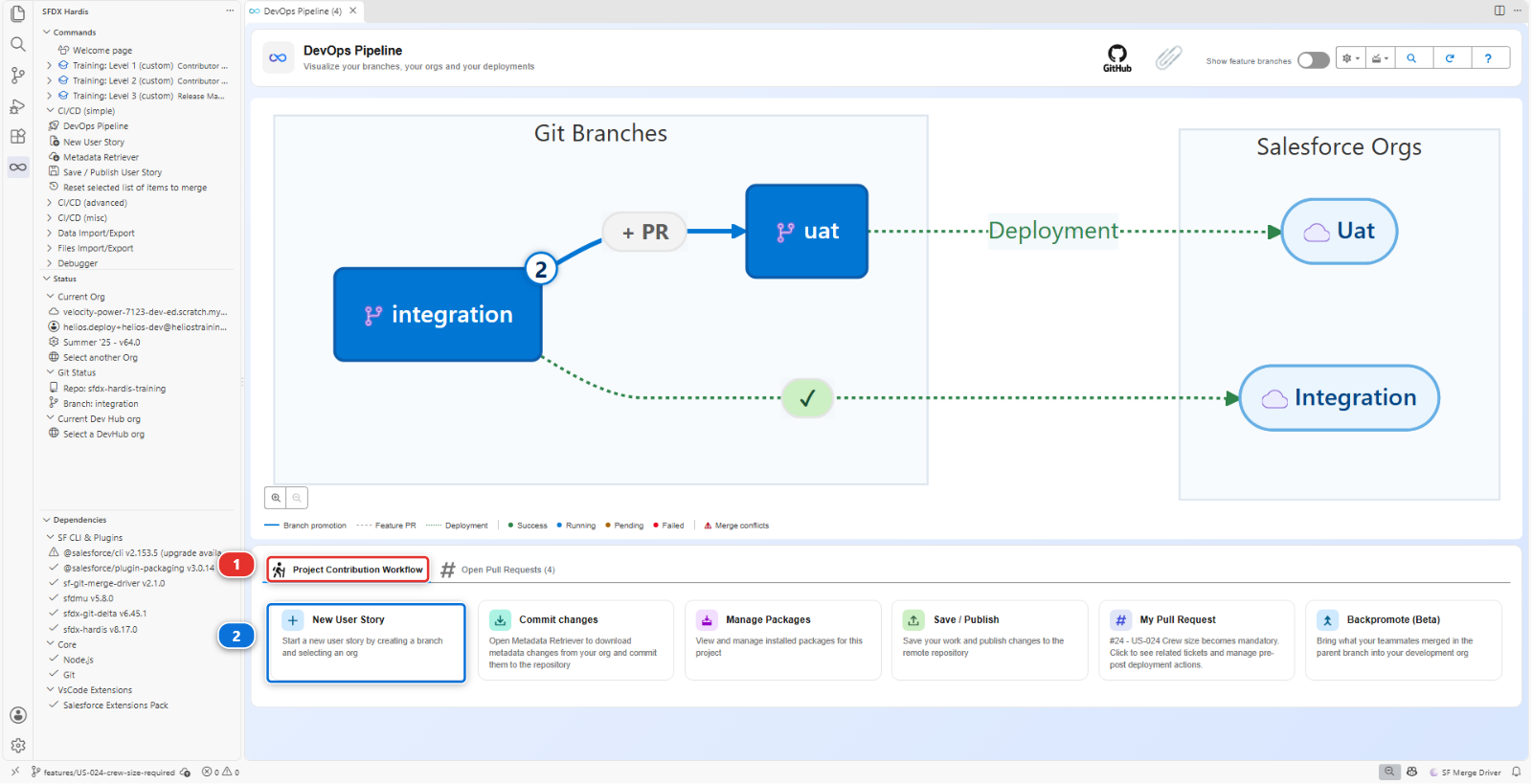
You should now see
- The User Story
US-027-schedule-by-availabilitystarted, withintegrationas its target
2. Add the change the way people actually write it
Goal a schedulableOn method in InstallationScheduler, on a Pull Request into integration.
The planner wants to check several installations at once.
Do
- Open
force-app/main/default/classes/InstallationScheduler.cls, the file the pipeline already deploys -
Paste in the method below, exactly as the developer who wrote it first did. It goes at the end of the class: just above the last line of the file, which is the closing
}of the classEdit this file/** * The installations from the list that can be scheduled on the given day. * * @param installationIds the installations to check * @param wanted the day the planner wants * @return the ids that can take a crew that day */ public static List<Id> schedulableOn(List<Id> installationIds, Date wanted) { List<Id> allowed = new List<Id>(); for (Id installationId : installationIds) { for (Panel_Batch__c batch : [ SELECT Arrival_Date__c FROM Panel_Batch__c WHERE Installation__c = :installationId ORDER BY Arrival_Date__c DESC LIMIT 1 ]) { if (batch.Arrival_Date__c != null && wanted >= batch.Arrival_Date__c.addDays(PREPARATION_DAYS)) { allowed.add(installationId); } } } return allowed; } -
Commit
InstallationScheduler.clsfrom the Source Control panel - Save / Publish, push, and open the Pull Request
Why
It is the obvious way to do it, and that is the point. This one is a file, not an org change, so there is nothing to retrieve.
You should now see
- A Pull Request into
integrationcarryingInstallationScheduler.cls, with its checks running
3. MegaLinter blocks you
Goal the query moved out of the loop: one query, whatever the size of the list.
The Mega-Linter check of your Pull Request is red, and the merge box reads Merging is blocked.
Do
-
Open the MegaLinter comment on the Pull Request. The finding is under code-analyzer-apex:
-
In
InstallationScheduler.cls, replace the method you pasted in step 2, from itspublic static List<Id> schedulableOnline to its closing}, with this one, and keep the comment above itEdit this filepublic static List<Id> schedulableOn(List<Id> installationIds, Date wanted) { Map<Id, Date> latestArrival = new Map<Id, Date>(); for (Panel_Batch__c batch : [ SELECT Installation__c, Arrival_Date__c FROM Panel_Batch__c WHERE Installation__c IN :installationIds AND Arrival_Date__c != null ORDER BY Arrival_Date__c ASC ]) { latestArrival.put(batch.Installation__c, batch.Arrival_Date__c); } List<Id> allowed = new List<Id>(); for (Id installationId : installationIds) { Date arrival = latestArrival.get(installationId); if (arrival != null && wanted >= arrival.addDays(PREPARATION_DAYS)) { allowed.add(installationId); } } return allowed; }
Why
The deployment check next to it is green: the tests still run more than 80% of the org's Apex, at about 81%. The code deploys, and it is still refused.
A SOQL query inside a for loop. Salesforce allows 100 queries per transaction, so this method
works perfectly for a planner checking five installations and throws
System.LimitException: Too many SOQL queries: 101 the first time somebody checks a hundred and
one. It will pass every test you write and fail on a busy Monday.
The fix is the one Apex pattern worth knowing by heart: query once, outside the loop, and index what you get back. One query, whatever the size of the list.
Why a linter is allowed to refuse
The loop works in every test and fails in production on the first busy day. Nobody reviewing a Pull Request reliably spots it, and the analyzer always does, which is why real projects make it blocking. It only refuses findings of Moderate severity and above: the Helios code has none, so the only thing that can turn this check red is what you just wrote.
You should now see
schedulableOninInstallationScheduler.clswith its one query before the loop, and no query inside it
4. The tests block you
Goal two tests of schedulableOn in InstallationSchedulerTest.cls, checking what the story asked for.
Do
-
Push the fix. MegaLinter no longer reports the loop, and its check turns green. Now the deployment check fails:
-
Read the verdict of the sfdx-hardis comment: ❌ Cannot merge into
integration: code coverage 76.92% is under the 80% target, and its Apex tests row reads the same -
Add the tests below to
force-app/main/default/classes/InstallationSchedulerTest.cls, the same way, just above the last}of the fileEdit this file@isTest static void schedulableOnRefusesBeforeThePanelsArrive() { Installation__c inst = [SELECT Id FROM Installation__c LIMIT 1]; Test.startTest(); List<Id> tooEarly = InstallationScheduler.schedulableOn(new List<Id>{ inst.Id }, Date.today()); List<Id> lateEnough = InstallationScheduler.schedulableOn(new List<Id>{ inst.Id }, Date.today().addDays(60)); Test.stopTest(); System.assert(tooEarly.isEmpty(), 'The crew cannot be sent before the panels arrive'); System.assertEquals(1, lateEnough.size(), 'A date after the buffer is allowed'); } @isTest static void schedulableOnIgnoresInstallationsWithNoBatch() { Installation__c lonely = new Installation__c(Status__c = 'Planned', Crew_Size__c = 2, External_Id__c = 'TEST-INST-003'); insert lonely; Test.startTest(); List<Id> allowed = InstallationScheduler.schedulableOn(new List<Id>{ lonely.Id }, Date.today().addDays(30)); Test.stopTest(); System.assert(allowed.isEmpty(), 'With no panel batch, nothing can be scheduled'); }
Why
Salesforce alone would have let it through, at 77% for its 75% floor: the project asks for more, and the check job holds it to that.
The loop version was short, and the org carried it at 81%. The fix is longer, and every one of its new lines is a line no test runs. You added a method with three branches and no test.
Note what the assertions do: they check the behaviour the story asked for, with a message that says why. A test that only runs the code to lift a percentage is worse than no test, because it makes the number lie.
The Crew_Size__c = 2 on the record the second test creates is not decoration. Lab 2.3 made that
field mandatory, so any test that inserts an installation without it now fails, and a failing test
is a failing deployment. Every test class in the org has to be checked for this, and that is the
real price of making a field required.
You should now see
- The two new test methods at the end of
InstallationSchedulerTest.cls
5. Run the checks before pushing this time
Goal your tests run in helios-dev from VS Code, before anything is pushed.
Two round trips through CI to find two things you could have found on your own machine. Do it the other way round from now on.
Do: the Apex tests
- In the Explorer, right-click
InstallationScheduler.cls, then SFDX: Deploy This Source to Org - Do the same for
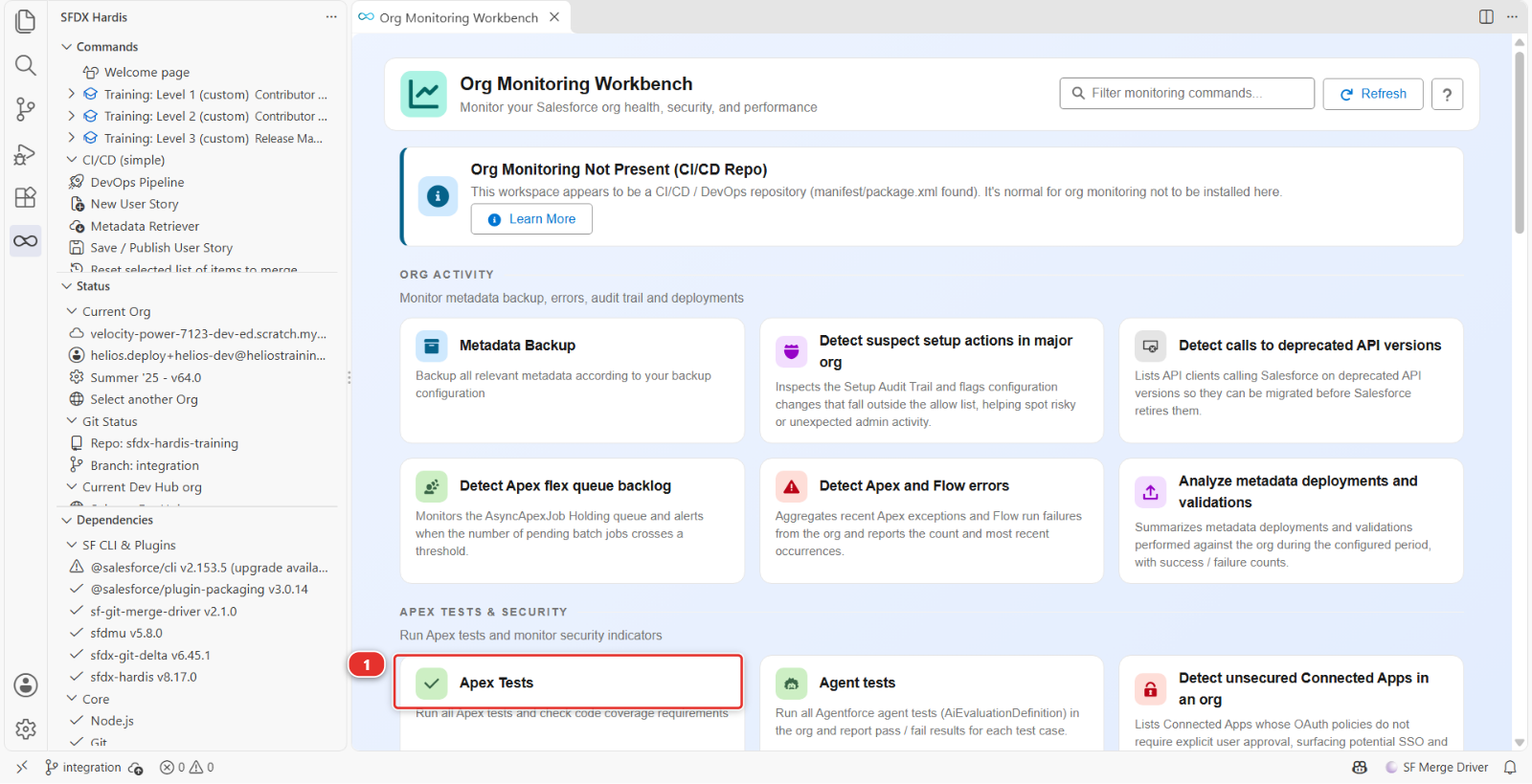
InstallationSchedulerTest.cls - Open the Org Monitoring Workbench panel: the Org Monitoring card of the Welcome page, or, in the sfdx-hardis side bar, the Org Monitoring section and its first entry, Org Monitoring Workbench
-
In the Apex Tests & Security section of that panel, click the Apex Tests card (1). Give it a few minutes: a scratch org queues its test runs, and the first one of the day can take ten
Why
Apex tests run in an org, and so far your change only exists in the project's files: the Apex
in helios-dev is still the old version. Send it there first. SFDX: Deploy This Source to Org
is the Salesforce extension that comes with the extension pack, and it sends that one file to your
default org.
There are two ways into the panel, and both land in the same place. The card asks for no org: it
runs on your default org, helios-dev. It runs the org's Apex tests and checks the same coverage
threshold the pipeline checks, so you get the pass, the fail and the percentage without pushing
anything.
The percentage is the one of helios-dev, and it is not the one the check prints. The two batch
classes of Labs 2.3 and 2.4 went to helios-integration through the pipeline, and reach your
org only with a backpromote: until then helios-dev counts fewer lines, and reads higher. What the card tells you for sure is
whether your tests pass, and whether your own class is covered.
Why the banner at the top is expected
Org Monitoring Not Present (CI/CD Repo) means this repository is a delivery pipeline and not a monitoring repository. The cards below it still work, against your default org. Lab 3.8 is where monitoring gets a repository of its own.
Why the Apex Tests tab is a different thing
A Pull Request in the DevOps Pipeline panel can show an Apex Tests (n) (beta) tab. It
runs nothing. It picks which test classes that Pull Request's deployment will run, and it only
appears on projects that set enableDeploymentApexTestClasses. Helios does not: it runs
RunLocalTests, every test in the org, every time.
Do: the linters
- Push, and read what they say on the Pull Request
Why in CI
Linters are the one check you cannot usefully run on your own machine, because they need a container image the CI already has. That is two minutes of waiting rather than twenty of setting up, and Level 3 shows the release manager's view of the same report.
Under the hood: the two commands behind those cards
The Apex Tests card runs the same command the pipeline runs:
sf hardis:org:test:apex
and the linters, on GitHub's machines, run MegaLinter with the Salesforce flavor. If you ever want
them on your own machine, that is npx mega-linter-runner --flavor salesforce, and it needs Docker.
Command documentation: hardis:org:test:apex
You should now see
- The Apex Tests card saying your tests pass, and your own class covered
- Both checks of the Pull Request green after the push
6. Push and merge
Goal the story merged, and schedulableOn in helios-integration.
Both green.
Do
- Merge
- Check
helios-integration
Under the hood: where these two gates come from
The coverage gate is config/.sfdx-hardis.yml:
testLevel: RunLocalTests
apexTestsMinCoverageOrgWide: 80
testCoverageNotBlocking: false
RunLocalTests runs every test in the org except managed package ones. The threshold is checked
org-wide, not per class, which is why one badly covered class can be carried by the rest of the
org for a while and then suddenly block somebody else's Pull Request. 75% is the Salesforce
minimum, below which no deployment goes through; this project asks for 80, and most real projects
set 80 or 85.
testCoverageNotBlocking: true turns the gate into a warning. It exists for projects taking over a
legacy org, and it is a temporary measure, not a setting.
The linters are MegaLinter, configured in .mega-linter.yml. The Salesforce flavour runs PMD
through Salesforce Code Analyzer on Apex, plus a flow scanner, plus the generic linters. It runs on
the whole repository for a Pull Request into a major branch, which is why a rule can fire on a file
you did not write.
The analyzer refuses because .mega-linter.yml says so, with
SALESFORCE_CODE_ANALYZER_APEX_DISABLE_ERRORS: false: the shared sfdx-hardis configuration only
reports Apex findings, and a project turns them into a gate. The linter is your team refusing. The
coverage floor is Salesforce refusing, and the project setting only chooses whether to ask for more. Neither of them checks that the code does
the right thing, which is the point: Salesforce is happy to deploy a hardcoded id with 100%
coverage.
You should now see
schedulableOninhelios-integration, with one query outside the loop
What you should see
- The Mega-Linter check green, and its comment without the loop of
InstallationScheduler.cls - The deployment check green, with coverage above 80% in the comment
-
schedulableOninhelios-integration, with one query outside the loop
If it goes wrong
MegaLinter fails on files you never touched.
It lints the whole repository for a Pull Request into a major branch. If a pre-existing problem
surfaces, fix it: you are the one who found it. If it is genuinely out of scope, the escape hatch is
a documented exclusion in .mega-linter.yml, never a blanket disable.
Coverage is still below the threshold after adding tests. Coverage is org-wide. Look at the per-class table in the Pull Request comment: another class may be dragging the average down.
The Apex Tests card says there is no org.
It runs against the org you are pointed at. Open Orgs Manager and check that helios-dev is
your current org, then run the card again.
The Apex tests pass locally and fail in CI. Almost always data. Your dev org has records the integration org does not, or the other way round. A test has to create the records it needs itself, rather than trusting whatever happens to be in the org.
Check your work
Welcome page > Training: Level 2 > Check my work, then pick Lab 2.5.
Go deeper
Next: Lab 2.6 - Permission sets, profiles and why a grant disappears